


ASO for Course & Coaching Apps: Niche Keyword Strategy
Updated March 12, 2026
App Store Optimization (ASO) is how people find your app through search in the App Store and Google Play, without you posting a link or running ads. For course creators and coaches, niche keywords outperform generic terms because they attract buyers, not browsers. Targeting "postpartum core rehab" instead of "fitness" drives qualified downloads that convert to subscribers. Free tools like ASOMobile and FoxData are enough to start today. The most impactful immediate step is replacing your app's current title with a [Problem] for [Audience] phrase. Do this consistently and you build organic, owned traffic that grows your monthly recurring revenue (MRR) independent of any social algorithm.
Most creators build a solid program and funnel all discovery through social media links. One algorithm change or account restriction cuts that traffic overnight. ASO offers a different path: once your app ranks for a niche keyword, that traffic compounds over time without a daily post or an ad budget.
This guide covers the specific keyword strategy, free and paid tool comparison, and step-by-step metadata instructions that help coaching and course apps in the Education and Health & Fitness categories drive consistent organic downloads through Passion.io.
Why generic ASO fails for coaching and course apps
The App Store rewards relevance, and relevance is specific. A keyword like "fitness" carries enormous search volume, but brands with millions of downloads, including Peloton, Nike, and Apple Fitness+, dominate it. AppTweak's brand vs. generic analysis shows that more than 97% of keywords with search volumes above 75 are brands. As a solo creator, you won't rank for those terms, and even if you did, the people searching them aren't looking for your specific coaching program.
High-intent keywords tell you what someone actually needs. "Kettlebell workouts" is a browse term. "Kettlebell training for desk workers with back pain" is a buying term. The person using that second phrase knows their problem, wants a specific solution, and will download your app and subscribe at a far higher rate. Volume is vanity, conversion is sanity.
The data backs this up: 70% of app downloads from search, particularly for non-game apps. If you sell courses or coaching programs, your category is exactly where this trend plays out most strongly. That means the majority of your potential audience is already searching for what you teach, and a strong ASO position in your category compounds over time rather than resetting every time a platform tweaks its feed algorithm.
The "Niche-First" keyword strategy for creators
The Niche-First strategy means starting with your audience's specific problem, not a broad category label. You know your niche better than any app store algorithm, so use that expertise as your research starting point. Your goal is to find keywords that describe exactly what your program solves at a difficulty level a newer app can actually compete for.
High-intent vs. high-volume keywords
Long-tail keywords describe a specific problem, audience, or outcome in three or more words. They typically carry lower search volume, but users are further along in decisions and far closer to taking action. Consider these comparisons:
| Generic (high volume) | Niche (high intent) |
|---|---|
| Learn guitar | Blues guitar licks for beginners |
| Fitness | Postpartum core rehab program |
| Meditation | Anxiety meditation for busy moms |
| Business | Sales funnel training for coaches |
| Yoga | Yoga for wrist pain recovery |
FoxData's keyword volume guide confirms that niche phrases face less competition, improving your chances of ranking higher in search results. A new puzzle game might struggle to rank for "puzzle game" but could rank well for "puzzle game for toddlers offline." That logic applies directly to coaching apps in any niche.
Four keyword patterns that work consistently for creator apps:
- [Problem] for [Audience] - "Core rehab for postpartum moms"
- [Skill] for [Level] - "Piano lessons for complete beginners"
- [Method] + [Outcome] - "TRX strength training program"
- [Feature] + [Use Case] - "Offline yoga for travel days"
Use these patterns to generate your initial keyword list, then validate each term through the tools in the next section before committing them to your metadata.
Analyzing the competition in Education and Fitness categories
The Education and Health & Fitness categories mix large ed-tech companies, aggregator platforms, and individual creator apps. Large players dominate broad terms, but they don't create content for your specific niche. That gap is where you compete and win.
Our ASO guide for Passion.io apps covers the category-specific dynamics that affect where creator apps appear in search and browse results. Review it before you build your keyword list, because category placement and keyword indexing work slightly differently on iOS versus Android, and those differences affect which fields to prioritize first.
Top ASO tools for coaches: Free vs. paid
You don't need a data science team or a $500/month enterprise subscription to do effective ASO for a coaching app. The free tiers available today are genuinely useful for keyword discovery and competitive analysis at the solo creator level. Our free ASO tools guide identifies the tools that work best specifically for creator apps.
Best free ASO tools for beginners
ASOMobile: ASOMobile's free tool suite includes 16 permanently free ASO tools, covering keyword check, keyword monitor, keyword suggest, and app report overview. No credit card is required and there's no time limit. This is the strongest free starting point for a solo creator who needs to identify niche keywords without a budget.
FoxData: FoxData starts at $0/month and includes keyword research, competitor analysis, and market intelligence. Its free plan is practical for checking keyword difficulty and estimated search volume before committing to a term in your metadata.
APPlyzer: The free tier includes unlimited apps, 100 keyword tracking slots, 12 months of historical data, and ChatGPT integration for keyword suggestions. It's a strong option for indie creators who want AI-assisted keyword discovery without a monthly fee.
Advanced paid tools for scaling apps
AppTweak: Entry plans start at $79/month and provide deep keyword insights, competitive benchmarking, and Apple Search Ads management. Its Atlas AI feature surfaces opportunities that manual research misses, and it's best suited for creators past their first 200 downloads who want to accelerate growth with multi-country tracking.
MobileAction: MobileAction plans range from $15/month to $999/month, with a 7-day trial on ASO Basic and Pro tiers. It combines ASO intelligence with ad intelligence, making it useful once you're ready to run Apple Search Ads alongside your organic keyword strategy. Our Apple Search Ads guide covers how paid and organic ASO work together on iOS.
Sensor Tower: Enterprise pricing, typically $500+/month. The depth of market intelligence it provides goes well beyond what a solo creator building toward mid-five-figure MRR needs.
Comparison: Features, pricing, and best use cases
| Tool | Price | Best for | Key feature |
|---|---|---|---|
| ASOMobile | Free | Beginners | 16 free tools, no credit card |
| FoxData | Free to $999+/mo | Small teams | Keyword difficulty + competitor data |
| APPlyzer | Free tier + paid | Indie creators | 100 keyword slots + AI suggestions |
| AppTweak | $79+/mo | Growing apps | Atlas AI, multi-country tracking |
| MobileAction | $15 to $999/mo | ASO + paid UA | Ad intelligence integration |
| Sensor Tower | Enterprise | Agencies, large teams | Market intelligence, revenue estimates |
Start with ASOMobile or FoxData. Run your initial keyword list through one of them, check difficulty scores, and identify 10-15 niche phrases to test in your next metadata update. Move to a paid tool once your app has consistent download volume and you need competitive depth to find the next growth lever.
How to optimize your Passion.io app metadata
Metadata includes the structured text fields app stores use to categorize and rank your app: your title, subtitle, keyword field, and description. This is where keyword research converts into real organic traffic. We let you update these fields directly inside your app settings dashboard without writing any code.
Step-by-step: Configuring titles and subtitles
- Log in to your Passion.io dashboard (or start your free trial if you haven't built your app yet) and open your App Settings.
- Open the App Store Settings section, where separate fields exist for iOS and Android submissions.
- Write your App Title using your primary niche keyword. Apple's App Store product page and Google Play's description guidelines both allow 30 characters for the app title. Use a niche-specific phrase here, not just your brand name.
- Write your Subtitle (iOS only). Apple allows 30 characters below the app name in search results. Use a complementary niche phrase that adds a different keyword angle. If your title is "Postpartum Core: Rehab Program," your subtitle could be "Pelvic Floor & Strength."
- Fill the Keyword Field (iOS only). Apple gives you 100 characters for comma-separated keywords with no spaces after commas. Do not repeat words already in your title or subtitle. Use this field for additional niche phrases, audience descriptors, and related terms.
- Write your Short Description (Android). Google Play gives you 80 characters visible before the full description. Treat this like your iOS subtitle: one clear, niche-specific value statement that pre-qualifies the reader.
- Save and submit your changes through your normal app update process. After 3-4 weeks, check your keyword positions using ASOMobile or FoxData to measure ranking impact, as app store algorithms need time to re-index your metadata and stabilize new positions.
Character limit reference:
| Field | iOS | Android |
|---|---|---|
| Title | 30 characters | 30 characters |
| Subtitle / Short Description | 30 characters | 80 characters |
| Keyword Field | 100 characters | Not applicable |
| Full Description | No strict limit | 4,000 characters |
Writing descriptions that convert readers to users
Your description's first three lines carry most of the weight. On the App Store, users see roughly 255 characters before the "more" button, and if those lines don't connect with their problem, they leave without downloading. Adjust's description best practices guide recommends leading with your user's pain point or desired outcome rather than a feature list.
Avoid opening with a generic claim: "[App Name] is the best fitness app for coaches who want to grow their business and help clients achieve their goals." That sentence could describe any app in the category. Instead, lead with the specific problem your audience searches for: "Struggling to stay consistent with your training? [App Name] gives you a structured 12-week program, daily push reminders, and a community of people with the same goal." That opening names the problem (inconsistency), states the solution (structured program), and signals the experience (community).
Four copywriting principles for coaching app descriptions:
- Lead with the problem or outcome your audience searches for, not your brand story or founder background.
- Add social proof early in the first paragraph: member count, completion rate, or a specific transformation result.
- Use scannable formatting throughout the full description: capital letters for section headers, short sentences, and bullet points for feature lists.
- Place your primary keyword naturally in the first two sentences, because AppTweak's description optimization guide confirms that Google Play's algorithm reads keyword density in the full description, with 2-3% density recommended for primary keywords.
Our app description guide walks through this framework with specific examples for course and coaching app formats.
Visual assets: Screenshots and preview videos
Screenshots are the highest-conversion element on your app store listing. Most users make a download decision based on visuals before reading a single line of your description. Use your app's actual UI to capture clean, on-brand screens that show your course content, community feed, and progress tracking in action.
Your first screenshot should communicate your core value proposition without any caption being required. After that, show the content experience: a lesson in progress, the community feed, or a progress dashboard in screenshots two and three. A preview video increases conversion further, particularly for courses with strong visual production. The Passion.io app walkthrough demonstrates which UI elements photograph well for promotional screenshots.
From download to subscriber: The conversion phase
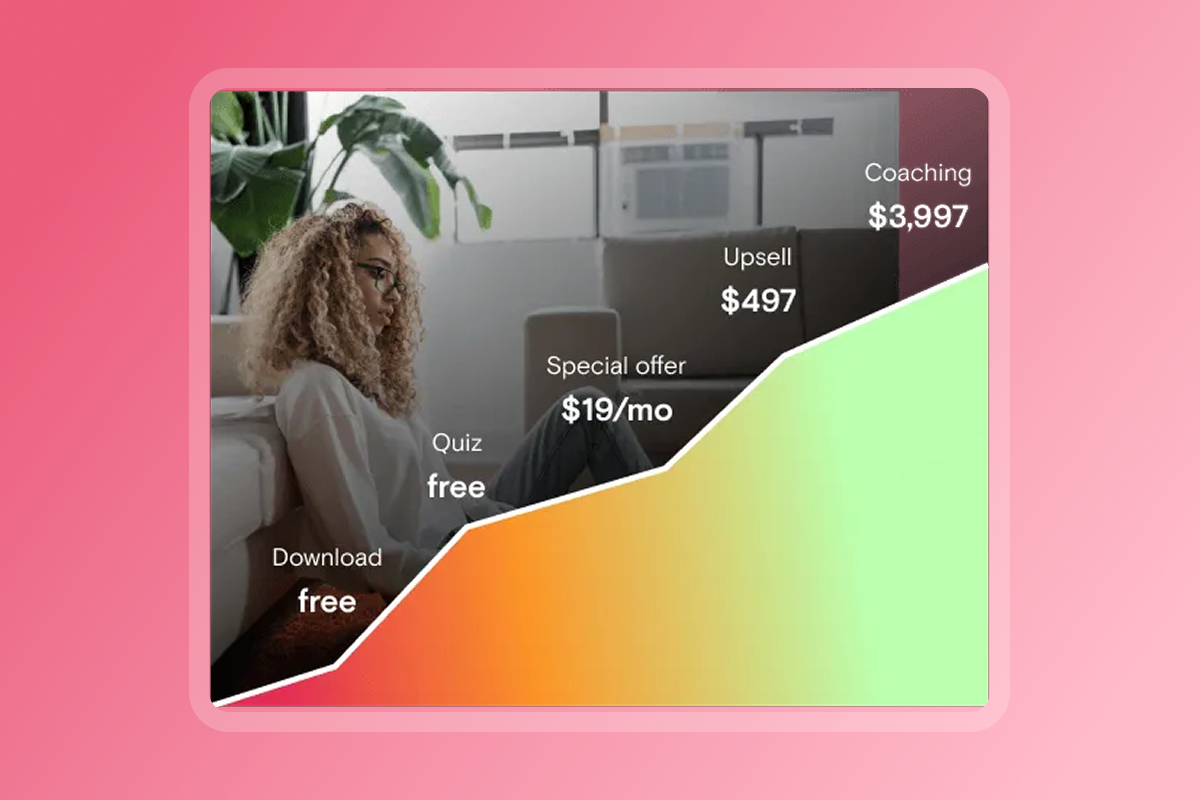
A download confirms interest. A subscription confirms value. Most coaching apps lose people in the first three days because the app doesn't match the expectation set by the keyword, or because onboarding friction delays the first win. Your ASO keyword strategy directly affects how wide that gap is.
When someone finds your app by searching "aerial yoga for complete beginners," they've already identified their problem and are actively seeking help. Their intent is far higher than someone who tapped a social bio link out of passing curiosity. That higher intent means they're more likely to complete onboarding, start your first module, and convert to a paid plan within their first week. Niche keywords pre-qualify your audience before they even open the app.
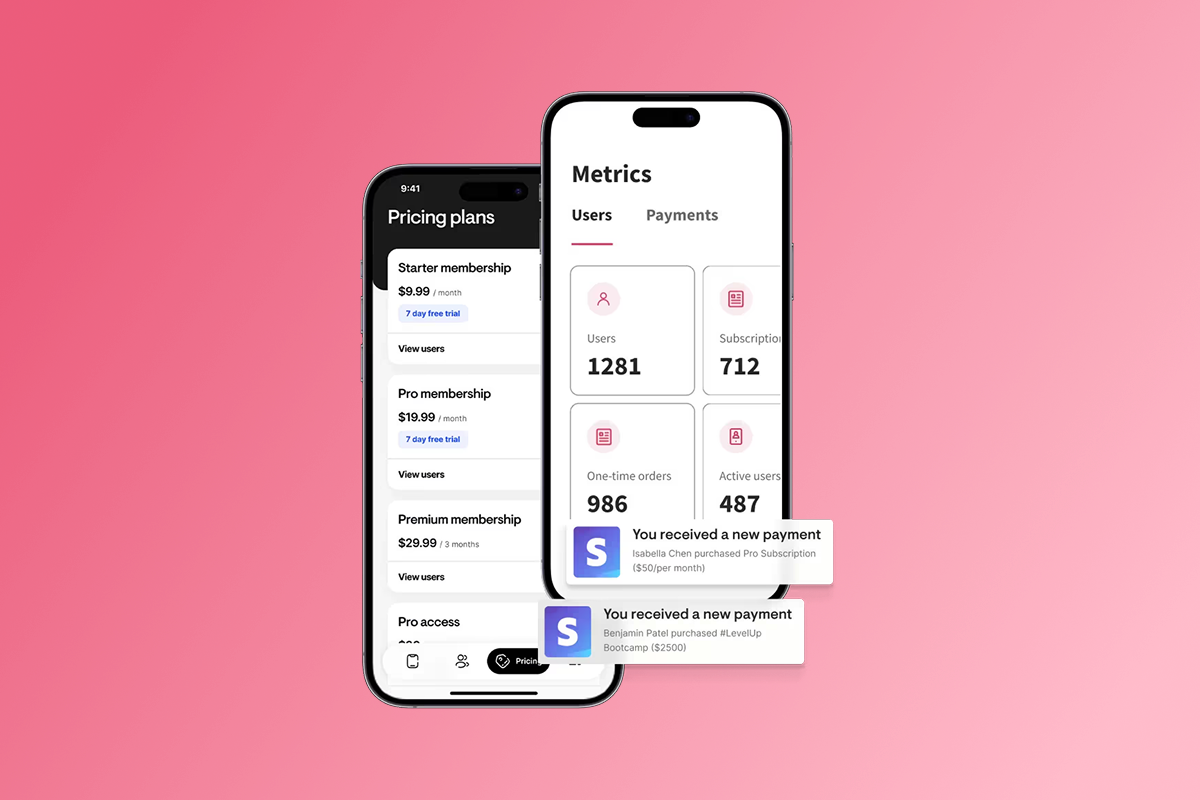
Once they're inside, your subscription structure and checkout path affect MRR directly. We support both web checkout via PassionPayments (3.9% platform fee plus Stripe processing) and in-app purchases (IAP), where Apple retains 15% for apps earning under $1M annually through the App Store Small Business Program or 30% above that threshold. For higher-priced programs ($97+/month), routing subscribers through web checkout protects more margin per sale. For lower-priced mobile upsells where convenience matters most, IAP reduces friction at the point of purchase. You can use our audience tracking tools to measure which entry point converts at a higher rate and adjust your pricing structure accordingly.
Creators who consolidate content, community, and payments inside a branded app report measurable shifts in how their business operates:
"Passion.io have been so supportive in helping me develop my App, the training, customer support (especially Hope) have been second to none!" - Karen on Trustpilot
ASO brings the right people in. Your onboarding flow, push notification cadence, and in-app community convert them into paying subscribers. Our training programs cover the full retention loop alongside the technical build, so you're not just setting up metadata and hoping for the best.
Niche ASO is a long-term play for owned audience growth
Generic ASO chases volume and loses to bigger players every time. Niche-First ASO finds the specific group of people searching for exactly what you teach and converts them at a rate that builds real MRR over time. The strategy is repeatable: identify the specific problem your program solves, find keywords that describe it at a manageable difficulty level, update your metadata, wait 3-4 weeks, measure, and refine each quarter.
Start today by logging into your Passion.io dashboard and reviewing your current app title. Run that term through ASOMobile or FoxData and check the difficulty score. If your title is still a category word like "fitness" or "coaching," replace it with a [Problem] for [Audience] phrase from your keyword research. That single change, applied to the right 30-character field, is the most impactful ASO move you can make this week.
Book a Passion.io demo and update your metadata with the confidence that our plan and subscription tools make iteration fast and code-free. The 30-day money-back guarantee lets you know just what you're signing up for.
FAQ: Common ASO questions for creators
How long does ASO take to work?
Most metadata changes require 3-4 weeks to show measurable ranking impact, as app store algorithms need time to re-index your data and stabilize new positions. Plan a quarterly review cycle and avoid changing keywords more frequently than every 3-4 weeks so you can accurately measure each update's effect.
Can I change my keywords later?
Yes. Both the App Store and Google Play allow metadata updates with each new app version submission. On iOS, your Promotional Text field (170 characters) updates without a new app version, making it a fast-moving testing field for messaging. Batch keyword updates alongside feature releases to keep your submission work efficient.
Do I need to pay for ASO tools?
No. ASOMobile's 16 permanently free tools and FoxData's free tier are genuinely useful for keyword discovery and competitor research at the solo creator level. Paid tools like AppTweak ($79+/month) or MobileAction ($15-$999/month) add competitive depth and multi-country tracking, but they're not required until your app has consistent download volume and you're ready to scale with data-driven keyword testing.
Should I focus on iOS or Android first for ASO?
Start with the platform where your audience already finds you. If most of your email list and social followers use iPhones, prioritize iOS metadata and Apple Search Ads. If you serve a global or budget-conscious audience, Android's larger install base and lower developer fee ($25 one-time vs. Apple's $99/year) may drive faster initial growth.
Glossary: Key ASO terms defined
ASO (App Store Optimization): The process of improving an app's visibility and conversion rate in the App Store or Google Play through metadata, visuals, and reviews. It's the app equivalent of SEO for websites.
Metadata: The structured text fields app stores use to categorize and rank your app, including title, subtitle, keyword field, and description. We let you edit these fields inside your app settings without code.
Keyword Difficulty: A score (typically 0-100) indicating how hard it is to rank for a specific keyword based on the strength of competing apps currently ranking for it. Lower scores are more achievable for new or smaller apps.
Organic Downloads: Downloads that come from unpaid search or browse activity in the app store, with no ad spend required. Strong ASO drives organic downloads, which compound over time as ranking improves.
Conversion Rate: The percentage of users who view your app store listing and then download the app. Niche-specific titles, relevant keywords, and high-quality screenshots all improve this rate.
IAP (In-App Purchase): A payment made inside an iOS or Android app, processed by Apple or Google, who retain 15-30% of the transaction value. Web checkout via PassionPayments (3.9% platform fee plus Stripe) is a lower-fee alternative for core subscriptions.
Long-tail Keyword: A search phrase of three or more words that is more specific and typically lower in both volume and competition than a broad single-word term. Long-tail keywords signal higher purchase intent and form the foundation of a Niche-First ASO strategy.