


White Label App Launch Timeline: 4 to 8 Week Guide
Updated February 12, 2026
TL;DR: White-label mobile app launches take 4–8 weeks from discovery to live, compared to 6–12 months for custom development. You face two main bottlenecks: content readiness and Apple/Google developer account verification. With Passion.io Plus, we handle app store submission while you focus on marketing. You need branding assets, finalized content, a privacy policy, and $124 in developer fees (Apple $99/year, Google $25 one-time). Most creators can see web apps live in weeks and full iOS/Android approvals within 2–3 days.
White-Label vs. Custom Development: Speed and Cost Comparison
Custom mobile app development costs $40,000 to $400,000+ depending on complexity. The average journey spans 3–9 months, with complex apps requiring 6–12 months. Annual maintenance adds another 15–20% of the original development cost, which means $8,000 to $80,000+ per year. You also need specialized iOS and Android developers.
White-label platforms compress that timeline to 4–8 weeks from start to live. Basic implementations cost $15,000–$30,000 in setup plus $5,000–$12,000 annually, while mid-tier solutions run $30,000–$70,000 setup plus $12,000–$30,000 per year. Maintenance is bundled into the subscription, so you avoid surprise bills when iOS 18 or Android 15 drops.
If you run multiple programs at mid-to-high revenue, choose white-label. Custom dev is a six-figure, six-month commitment with technical debt. White-label is a four-to-eight-week deployment with predictable costs and automatic updates.
| Factor | White-Label (Passion.io) | Custom Development |
|---|---|---|
| Timeline | 4–8 weeks | 3–9 months (6–12 for complex) |
| Upfront Cost | $15,000–$70,000 | $40,000–$400,000+ |
| Annual Maintenance | $5,000–$30,000 (bundled) | $8,000–$80,000+ |
| Technical Skills | No coding required | Requires iOS/Android developers |
The 4-Phase Launch Timeline at a Glance
The white-label launch follows four sequential phases: discovery and strategy, design execution and content migration, developer account setup and App Store submission, and soft launch with marketing push. We see creators on the Passion.io Plus plan routinely launch in 30 days or less with white-glove submission support.
The key is having your content, branding, and legal documents ready before you start the clock. Without these assets prepared, you will add 1–2 weeks to your overall timeline.
Phase 1: Discovery and Strategy (Week 1)
Week 1 is a strategy sprint where you meet with your dedicated success manager (if you choose Plus) to map your monetization model, content structure, and brand requirements. You decide which courses go into the app first, how you will price subscriptions (monthly, annual, or both), and whether you will use PassionPayments for web checkout or in-app purchases for mobile.
Your success manager walks you through the developer account requirements so you can start the Apple and Google verification processes immediately. Apple requires a D-U-N-S number, which takes up to 5 business days to receive from Dun & Bradstreet, though in most cases you receive your number within 30 business days for standard processing. You also confirm your privacy policy URL and terms of service, both of which are mandatory for App Store approval.
The discovery phase sets the foundation for everything that follows. If you enter Week 2 without finalized content or branding, you will add 1–2 weeks to your overall timeline because content preparation causes most delays, not technical configuration.
"Our support team has been so helpful and personable from day one. We really appreciate our CSM, Connor, who has been so quick to respond to any questions we may have, making this experience so informative and smooth." - Angie on Trustpilot
Phase 2: Design and Content Migration (Weeks 2–3)
Weeks 2 and 3 are execution. Your app takes shape as you embed content, apply branding, and add interactive features without touching code. On Passion.io, you drag in videos, audios, PDFs, and text to build interactive lessons with quizzes, timers, and goal tracking. You also set up your in-app community channels and challenge structures.
If you choose the Plus plan, your team handles the technical configuration while you focus on content. If you are self-serve, you follow step-by-step tutorials to configure everything yourself. Either way, the no-code drag-and-drop platform lets you design, build, and launch in just a few hours without technical experience.
You finalize your app store listing assets at this stage: app name, subtitle, description, keywords, and promotional screenshots. App Store Optimization (ASO) starts here, not after launch.
Critical tasks for Weeks 2–3:
- Content upload: Migrate your top 5–10 courses or lessons. Launch with your best material and add more later.
- Branding applied: Logo, colors, fonts, and custom splash screen configured.
- Monetization connected: PassionPayments (Stripe) integrated for web checkout, or in-app purchase pricing configured in your developer accounts.
- App store listing drafted: Name, subtitle, description, keywords, and screenshots customized for each platform prepared.
- Web app tested: Internal team or beta users test login, lesson playback, community posting, and checkout flows.
As a result, if your developer accounts are approved by the end of Week 2, you can move to submission by Day 14. If Apple or Google requests additional documentation, expect a 3–5 day delay.
"I've been with Passion apps for 3 years now and it's been an awesome experience working with the Ultimate Plus team to build and grow my app. I recently had the opportunity to test out the new Passion Funnels and it's been going well." - Seychelle SUP on Trustpilot
Phase 3: Developer Accounts and Submission (Weeks 4–6)
In Weeks 4–6, you move into app store submissions. By now, your Apple Developer Program enrollment should be complete (you paid the $99 annual fee) and your Google Play Console account is live ($25 one-time). You are ready to submit your app for review.
Apple uses App Store Connect, where you upload your app binary, screenshots, privacy details, and age rating responses. Google uses the Play Console with similar fields. Both platforms review your app for compliance before making it publicly available.
Apple App Store submission:
Apple's review process works quickly in 2026. On average, 90% of submissions are reviewed in less than 24 hours, and most apps move through review within 24–48 hours. However, reviewing the very first version of an app can take longer, up to 1 month for complex apps or new developer accounts.
The most common rejection reasons are privacy policy issues (the single biggest reason), crashes or bugs (Guideline 2.1), and in-app purchase violations (Guideline 3.1.1). Over 40% of unresolved issues relate to Guideline 2.1, which covers incomplete information, placeholder content, and unstable performance. If Apple rejects your app, you fix the noted issues and resubmit. Re-review after rejection usually takes 24–72 hours.
Google Play Console submission:
Google's review typically takes 3–5 days, often longer for new developers. Google requires more extensive testing for certain developer accounts. Newly created personal developer accounts (after November 13, 2023) must run a closed test with a minimum of 12 testers who have been opted-in for at least 14 consecutive days before production access is granted.
"I only give them a 4 out of 5 because the actual process of getting your app approved by the Google Play Store in particular is a lot more challenging than Passion makes it sound. It took me many months." - Jesse Wiens Chu on Trustpilot
How Passion.io Plus accelerates this phase:
If you are on the Plus plan, we handle the submission logistics for you. We prep your metadata, upload your app binaries, and communicate with Apple/Google if clarifications are needed. You approve the final assets and we execute. This removes 5–10 hours of work from your plate and reduces the risk of metadata rejections.
Therefore, if both stores approve on the first try and you face no delays, you can have live apps within 4–6 weeks of starting the process. If you face rejections, add 1–2 weeks for fixes and resubmission. Responding to Apple's guideline emails quickly is critical to staying on schedule.
Phase 4: Soft Launch and Marketing Push (Week 7+)
You launch in Week 7. Your iOS, Android, and web apps are live. Now you drive installs and subscriptions. Start with a soft launch to your existing email list and social followers. Send a direct email with download links for iOS and Android, highlighting the new push notification features and offline access.
Push notifications give you direct access to users' home screens. Unlike email, which averaged 43.46% open rates in 2025 but still requires users to check their inbox, or social posts where algorithms control reach, push messages hit users where they already spend time. Plan a push notification strategy with regular scheduled messages: one for new content drops, one for engagement nudges (challenge checkpoints, milestone celebrations, live session reminders). Research shows promotional push notifications should be sent no more than 2–3 times per week to avoid notification fatigue.
Launch communication strategy:
- Pre-launch: Tease the app launch on social media and build a waitlist or early-bird offer.
- Launch day: Email blast to your full list with app store links and social media posts with demo screenshots.
- Week 2: Welcome email sequence for new app users and push notifications introducing key features.
- Weeks 3–12: Weekly content drops announced via push, user success stories shared, and engagement challenges launched.
"Step by step guidance, it's basically impossible not to know what to do next and even if you don't, there is support team that will guide along the journey. Regarding Appstore and Google developer authorisation, the passion.io team are backing you up in case you need any help, explaining and answering questions and giving you (in advance) all the information needed to go smoothly with the process." - Georgiana Vasilescu on Trustpilot
Your first 90 days post-launch determine retention. Interactive courses with quizzes and timers help drive completion. So does offline access, which removes friction for users traveling or in low-signal areas.
Critical Requirements to Prepare Before You Start
Before you begin this timeline, you need specific assets ready. Missing any of these adds days to your schedule.
Branding and design:
- Logo files in multiple formats (PNG, SVG) and sizes (512x512, 1024x1024 for app icons)
- Brand color hex codes (primary, secondary, accent)
- Font specifications (if using custom fonts)
Content and structure:
- Top 5–10 courses or lesson sets finalized (video, audio, PDFs, text)
- Community channel structure planned (how many channels, public vs. private)
- Pricing plans decided (monthly, annual, one-time, freemium tiers)
Legal and compliance:
- Privacy policy URL live and accessible
- Terms of service URL live
- Support email address for app store listings
Developer accounts:
- Business email address (not Gmail/Yahoo for organization accounts)
- D-U-N-S number request initiated (start this 5–30 days before launch planning)
- Credit card for Apple ($99/year) and Google ($25 one-time) fees
Payment processing:
- Stripe account connected to PassionPayments for web checkout
- Or in-app purchase pricing configured (15–30% to Apple/Google)
Understanding the App Store Review Process
Apple and Google review every app submission to ensure it meets their guidelines. Real humans test your app, check your metadata, and verify compliance with privacy and payment rules.
What reviewers check:
- App completeness: Does the app work without crashes, broken links, or placeholder content?
- Privacy compliance: Is your privacy policy accessible and does it explain what data you collect?
- Payment rules: If you sell digital goods, are you using in-app purchases correctly?
- Content accuracy: Does your app description match what the app actually does?
- Legal compliance: Age ratings, copyright permissions, and restricted content rules.
Privacy is a core of the Apple ecosystem and non-compliance is among the top reasons for denials. Your policy must be linked in App Store Connect metadata and accessible within the app. It must explain what data you collect (email, payment info, usage analytics), how you store it, and whether you share it with third parties.
If Apple or Google rejects your app, they send an email with the specific guideline violated. You fix the issue and resubmit. Resubmissions after rejection usually take 24–72 hours because reviewers focus only on the corrected areas.
Common rejection scenarios:
- Privacy policy missing or broken link: Upload policy to your website and update URL in App Store Connect
- Crashes on launch: Fix code bug, rebuild app, and resubmit
- IAP not implemented for digital goods: Add IAP or adjust monetization approach
- Misleading app name or description: Rewrite metadata to accurately describe app
We review your submission before it goes live on Passion.io Plus, catching common mistakes (broken links, missing privacy policy, incorrect age rating) before Apple or Google see them. This reduces your rejection rate and speeds approval.
Total Cost of Ownership (TCO): Fees and Maintenance
Launching a white-label app involves platform subscription fees, developer account renewals, and payment processing fees based on your revenue. Here is the full cost breakdown for Year 1:
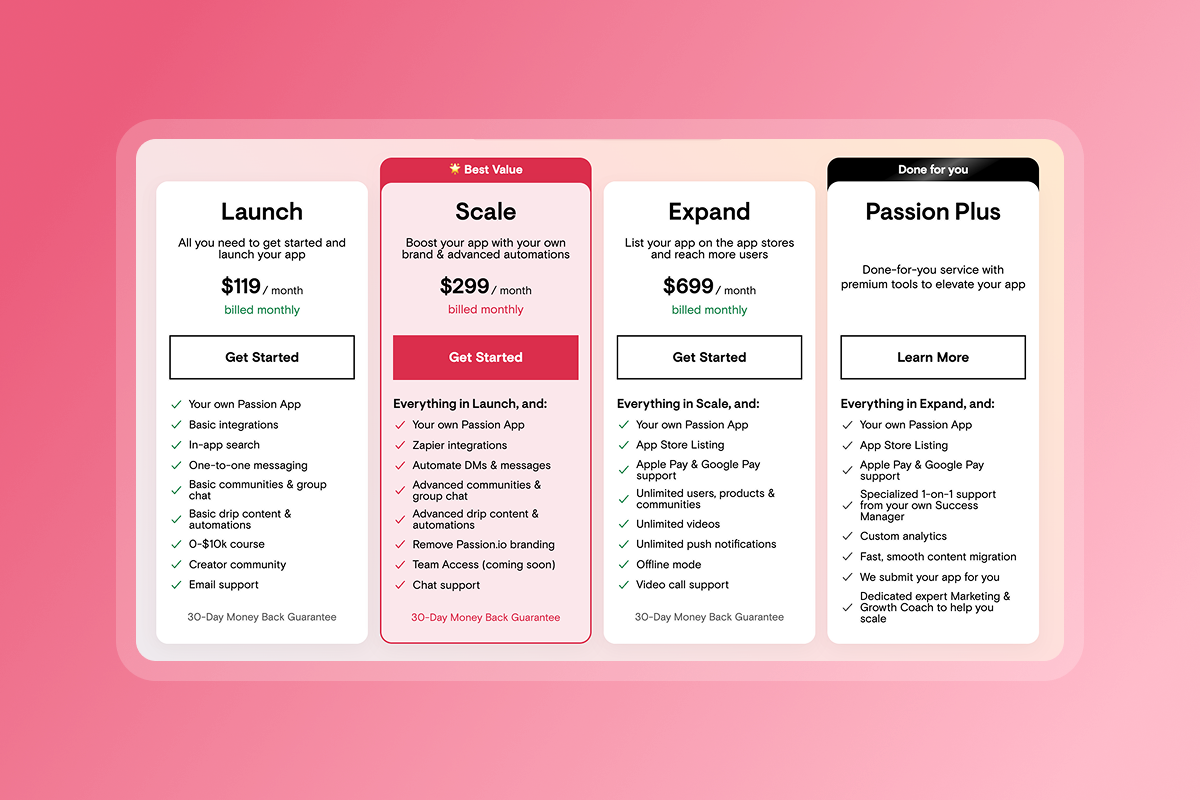
Platform subscription (Passion.io):
- Launch plan: $99/month billed annually = $1,188/year
- Scale plan: $239/month billed annually = $2,868/year
- Expand plan: $599/month billed annually = $7,188/year
- Plus plan: Custom pricing, typically $10,000–$20,000 for white-glove onboarding
Developer accounts:
- Apple Developer Program: $99/year
- Google Play Console: $25 one-time
Payment processing fees:
- PassionPayments (web checkout): 3.9% platform fee plus Stripe's standard processing fees (2.9% + $0.30), totaling approximately 6.8% plus $0.30 per transaction
- In-app purchases (IAP): 15–30% to Apple/Google. Rates are 15% for subscriptions after Year 1 or developers earning under $1M annually via Small Business Program, and 30% otherwise
- External checkouts (Stripe direct, PayPal): 0% Passion.io fee, only processor fees apply
Example Year 1 TCO (mid-tier creator on Expand plan with $50k revenue via PassionPayments):
- Platform subscription: $7,188
- Apple Developer: $99
- Google Play: $25
- Payment processing (6.8% of $50k): $3,400
- Total: $10,712
Compare this to custom development maintenance, which costs 15–20% of original dev spend annually. If your custom app cost $100k to build, you pay $15k–$20k per year just to keep it running. White-label TCO is lower, predictable, and includes automatic platform updates. There's a 30-day money back guarantee, as well.
Conclusion
A white-label mobile app launch takes 4–8 weeks when you prepare your content, branding, and legal documents before Day 1. The technical work (app builds, store submissions, payment integration) falls to your platform partner. Your job is to show up with finalized assets and make decisions when prompted.
The Passion.io Plus plan compresses this timeline to 30 days or less by assigning you a dedicated success manager who runs the technical playbook while you focus on marketing. You skip the learning curve of App Store Connect, the frustration of metadata rejections, and the late-night troubleshooting of IAP configuration.
For high-revenue creators, the opportunity cost of waiting is higher than the cost of paying for done-for-you service. Every month you delay is a month of potential MRR lost. Launch fast, iterate based on real user feedback, and use push notifications to drive retention from Day 1.
Book a demo of Passion.io Plus to see the exact submission workflow we handle for creators in fitness, wellness, and business coaching who launch in 4–8 weeks. Or download the 30-Day App Launch Checklist to audit your content and branding assets today.
Frequently Asked Questions About App Launches
How long does Apple App Store approval take?
90% of apps are reviewed in less than 24 hours, though first-time submissions may take 3–7 days for thorough checks.
What is a D-U-N-S number and why do I need one?
A D-U-N-S number is a unique business identifier from Dun & Bradstreet required by Apple to verify your organization. It takes up to 5 business days to receive after requesting.
Can I launch on web first and add mobile later?
Yes. Your web app can go live in 2–3 weeks while you complete developer account setup and store submissions for iOS/Android.
What happens if Apple or Google rejects my app?
You receive an email explaining the specific guideline violated. Fix the issue and resubmit. Resubmissions typically process in 24–72 hours.
Do I need to resubmit my app for every content update?
No. Content updates (new lessons, community posts) happen server-side and do not require resubmission. You need to resubmit when adding new pricing plans, changing prices, updating screenshots or logos, or adding new app features.
Key Terminology for App Owners
D-U-N-S Number: A unique 9-digit identifier assigned to businesses by Dun & Bradstreet, required by Apple to verify your organization's legal status for the Apple Developer Program.
In-App Purchase (IAP): A transaction processed through Apple or Google's payment systems for digital goods sold inside your app. Apple and Google retain 15–30% of each transaction.
PassionPayments: Passion.io's web-based checkout system powered by Stripe. You pay a 3.9% platform fee plus standard Stripe processing fees (2.9% + $0.30) for transactions.
App Store Optimization (ASO): The process of improving your app's visibility in app store search results through keyword optimization, compelling descriptions, and high-quality screenshots.
Developer Account: A paid membership with Apple ($99/year) or Google ($25 one-time) that allows you to publish apps on their platforms.