


How to Build an In-App Community for Creators: Better Engagement Than Facebook Groups
Updated January 26, 2026
Moving your community from Facebook Groups to a branded app can increase course completion by 15–30% by giving you control over notifications, removing distractions, and unifying content with conversation. Launch your web app in as little as two weeks and reach app stores in 4–8 weeks using no-code platforms like Passion.io. Typical costs include a monthly subscription starting at $99 (annual pricing), the Apple Developer Program at $99/year, Google Play at $25 one-time, a 3.9% web fee via PassionPayments, and 15–30% fees on in-app purchases through Apple and Google.
Why Facebook Groups and Discord are killing your course completion
According to Social Status data from 2024, Facebook's organic reach averaged just 1.37%, with engagement rates at a median of 0.2%. When you post an important update or challenge reminder in your paid group, the algorithm shows it to only 1-2% of your members organically. This isn't a bug - it's by design. The platform optimizes for ad views, not your students' success.
Tool sprawl compounds the problem. Most creators juggle DMs, a Facebook group, Zoom links, Stripe checkouts, and a separate LMS. Members log into your course platform to watch a lesson, then switch to Facebook to ask a question, then check email for your payment receipt. Each context switch creates friction that kills momentum. According to Jmango360 mobile commerce research, users spend 78% of their time in apps rather than mobile websites because apps remove that friction.
However, Discord and Slack solve the algorithm problem but create new ones. Members get buried in notification noise from other servers. Your carefully structured channels compete with memes and off-topic chatter. The result is the same: low completion rates, weak renewals, and burned-out creators answering the same access questions across five platforms.
When Socialinsider measured Facebook's reach rate at 1.20% for the previous year, the message became clear. You're building on rented land where the landlord controls whether your tenants see your announcements. That's not a business model, it's a risk.
What is an in-app community and how does it drive retention?
An in-app community is a unified space where your courses and conversations live together in a branded mobile app you own. Instead of watching a lesson on one platform and discussing it on another, members interact with both in the same environment. This contextual learning drives the completion lift creators report.
Push notifications make the difference. Push notifications achieve 20% open rates on average across industries. Omnisend research shows push notifications deliver a 52.86% open rate compared to 22.94% for email. These messages appear on your member's lock screen even when they haven't opened your app in days. You can nudge them directly to a specific lesson or conversation thread.
This notification advantage creates a habit loop. Push triggers awareness, the app provides the content, and the community delivers social proof when members share wins. That cycle builds daily engagement. Batch's benchmark report shows contextual campaigns achieve 14.4% open rates versus 4.19% for generic blasts, proving that targeted nudges work.
Passion.io creators report 15-30% higher course completion rates within 90-180 days of launching branded apps. When you remove distractions and control the notification layer, members finish what they start. According to Circle.so research, weekly prompts and peer check-ins contribute to 40-60% completion rates, roughly 3x higher than courses without them.
As a result, active communities reduce your support load because members help each other. When someone asks "How do I download this lesson?", other members reply before you see the question. Building engaged communities improves retention because subscribers feel connected to a group, not just consuming content in isolation.
"I purchased Passion.io to build an app that was easy for me and my clients to utilize. The group onboarding training was super helpful to getting started on the right foot." - LAT CPA Firm on Trustpilot
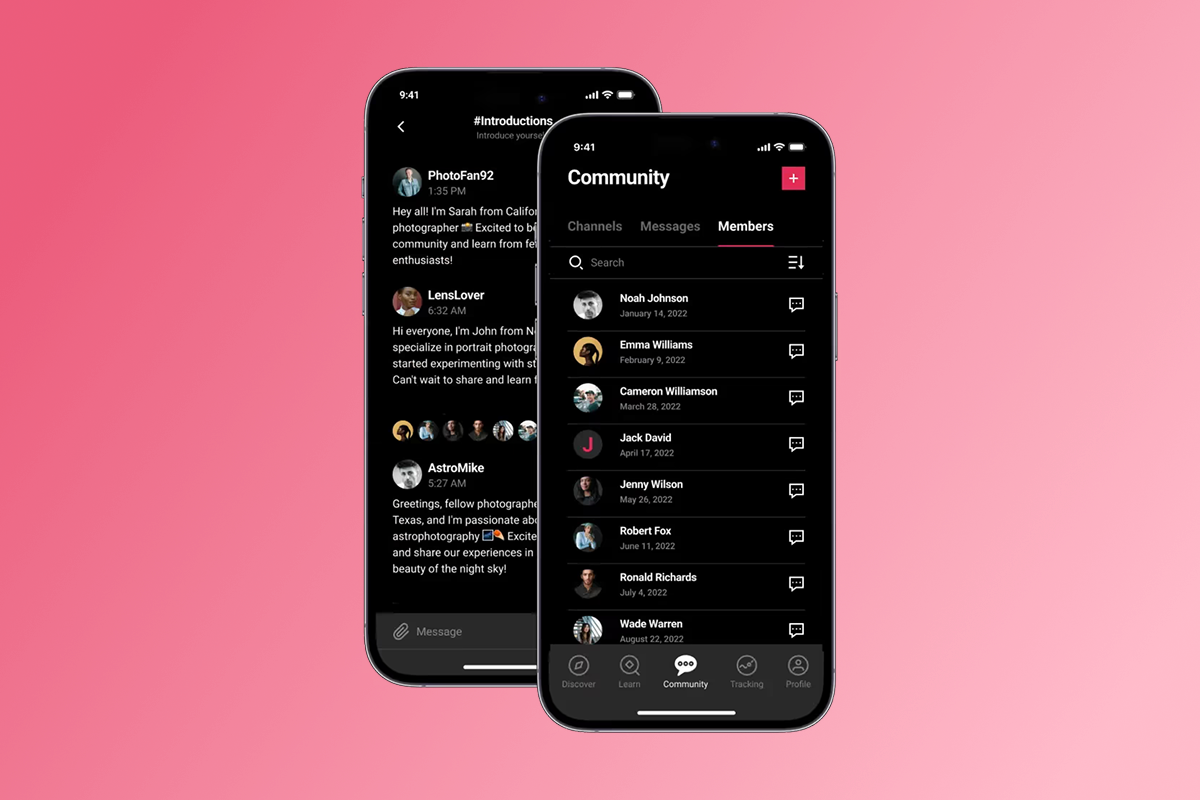
Passion.io's community features let you create unlimited channels linked to specific pricing plans. You can build free onboarding communities, paid accountability groups, or VIP channels for annual members. The platform handles the access rules, so you focus on content and moderation.
5 steps to build a branded in-app community (without code)
1. Define your community structure
Start by mapping channels to member needs. Most creators build four core channels: onboarding (free), general discussion (all members), course-specific Q&A (linked to lessons), and wins/celebrations. Passion.io lets you create limitless communities and link each to one or more pricing plans, with a 30-day money back guarantee.
Decide between announcement-only channels and open discussion threads. Use announcement channels for weekly prompts where only you post but members can react. Open discussion channels work for peer support and accountability check-ins. Set rules for whether members can DM each other or only message you.
2. Seed content before launch
Never open an empty community. Pre-load three types of content: a welcome post explaining channel purposes, an "Introduce Yourself" thread with your own introduction as the first comment, and 2-3 discussion starters relevant to your first lesson module. This gives early members something to react to immediately.
Building engaged communities requires upfront work. Plan your first 7 days of posts and questions. Schedule them using Passion.io's notification system or Zapier automation. One creator strategy involves posting a "Day 1 Challenge" tied to lesson content, then following up with a "Share Your Progress" thread 48 hours later.
3. Set up your push notification cadence
Push notifications bypass email inboxes and social algorithms. Plan a consistent schedule - most successful creators send 2-3 per week. Monday motivation posts, Wednesday lesson reminders, and Friday wins threads work well. Use custom notifications to link directly to specific community posts or lessons.
Timing matters. Morning nudges (6-9am in your members' local time zones) see higher open rates than afternoon sends. Use Passion.io's analytics to identify when your audience is most active, then test different formats: question prompts ("What's your biggest challenge this week?"), milestone celebrations ("You're 50% through!"), and peer highlights ("See how Sarah solved this..."). According to Batch research, contextual campaigns achieve open rates 3.5x better than generic blasts.
4. Integrate community with course content
Position community channels next to related lessons in your app navigation. When members finish a video on "Week 1: Foundation," they should see a "Week 1 Discussion" channel immediately below. This contextual placement drives the completion lift because members ask questions while the lesson is fresh.
Passion.io's challenge features let you integrate structured programs with community interaction. Build a 30-day transformation challenge where members check in daily, share photos, or log workouts. Use drip schedules to release new modules weekly or unlock content based on completion milestones. This prevents overwhelm and keeps discussions focused on current material.
"I am thrilled with everything so far. Incredible support, constant innovation, a step by step guide so you can follow the process, and the best FB community I have ever belonged to." - Lori on Trustpilot
5. Submit to app stores and launch
Your web app goes live in 2-3 weeks after building. App Store submissions typically start by week 3-4, with most creators fully published across iOS, Android, and web within 4-8 weeks. You'll need an Apple Developer Program account ($99/year) and Google Play Developer registration ($25 one-time).
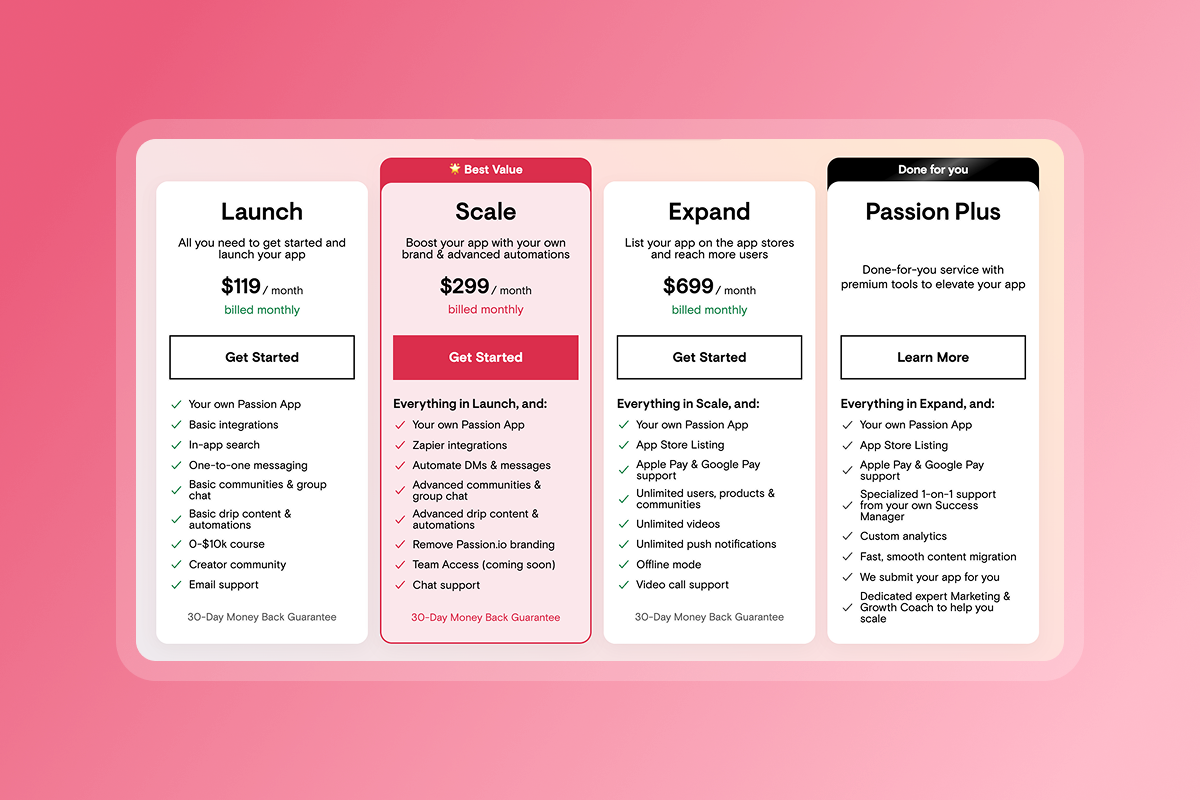
Passion.io's Expand and Plus tiers include submission support, while Launch and Scale plans provide detailed checklists. According to Apple's official data, 90% of submissions are reviewed in less than 24 hours. Once approved, your community lives at members' fingertips with your brand on their home screens.
How to migrate your audience from social media to your app
The sunset strategy works better than parallel communities. Announce the transition 2-3 weeks before launch, explaining why the new app delivers a better experience. Frame it as an upgrade, not an abandonment. "This Facebook group stays open until [DATE], then all new content moves to the app" sets clear expectations.
Offer founding member incentives. Give early adopters a special badge, locked content only available in the app, or a discounted annual rate for switching in the first 30 days. Case studies show that exclusive perks motivate faster transitions than gentle suggestions.
Your week-by-week timeline should follow this pattern:
- Week 1: Announce the move and share app preview screenshots.
- Week 2: Start posting "app-only" content teasers in Facebook while maintaining normal activity.
- Week 3: Send direct invites to your most engaged members first.
- Week 4: Final reminder that new discussions happen only in the app after the cutoff date.
According to migration guides from Uscreen, successful transitions involve downloading all video content from Facebook, then systematically re-uploading to the new platform. This maintains continuity and familiarity. Use tools to export your top discussion threads and pin them as "Classic Posts" in your new community channels.
Plan for overlap but not indefinitely. Run both platforms for 30-60 days maximum. As activity shifts to the app, your Facebook engagement will naturally decline. Clear communication about the timeline and benefits drives adoption.
How do I monetize an in-app community: Subscriptions, bundles, and one-time fees?
Recurring revenue should be your primary model. Passion.io supports subscriptions at weekly, monthly, and annual intervals. Most creators price monthly access at $29-$99 and annual at 10-12 months' worth of monthly fees. Annual pricing improves cash flow and reduces churn.
The fee structure matters for your margins. PassionPayments charges 3.9% on web checkouts plus Stripe's standard processing fees (approximately 2.9% + $0.30). For a $49/month subscription sold via web, PassionPayments takes 3.9% ($1.91) and Stripe takes approximately 2.9% + $0.30 ($1.73), leaving you with roughly $45.36 after fees.
In-app purchases through Apple or Google involve different economics. Developers making less than $1 million annually qualify for 15% fees under both companies' small business programs. Above $1 million, rates jump to 30%. However, Passion.io charges 0% platform fee on IAP transactions, so you only pay Apple or Google's cut.
Your strategy should optimize for both channels. Sell core subscriptions via web checkout to maximize margin, then use IAP for impulse upsells inside the app. A $99 annual plan purchased on your website keeps more revenue than the same purchase through Apple Pay, but mobile convenience converts casual browsers into buyers. External checkouts via ThriveCart or PayPal integrated through Zapier incur 0% Passion fees.
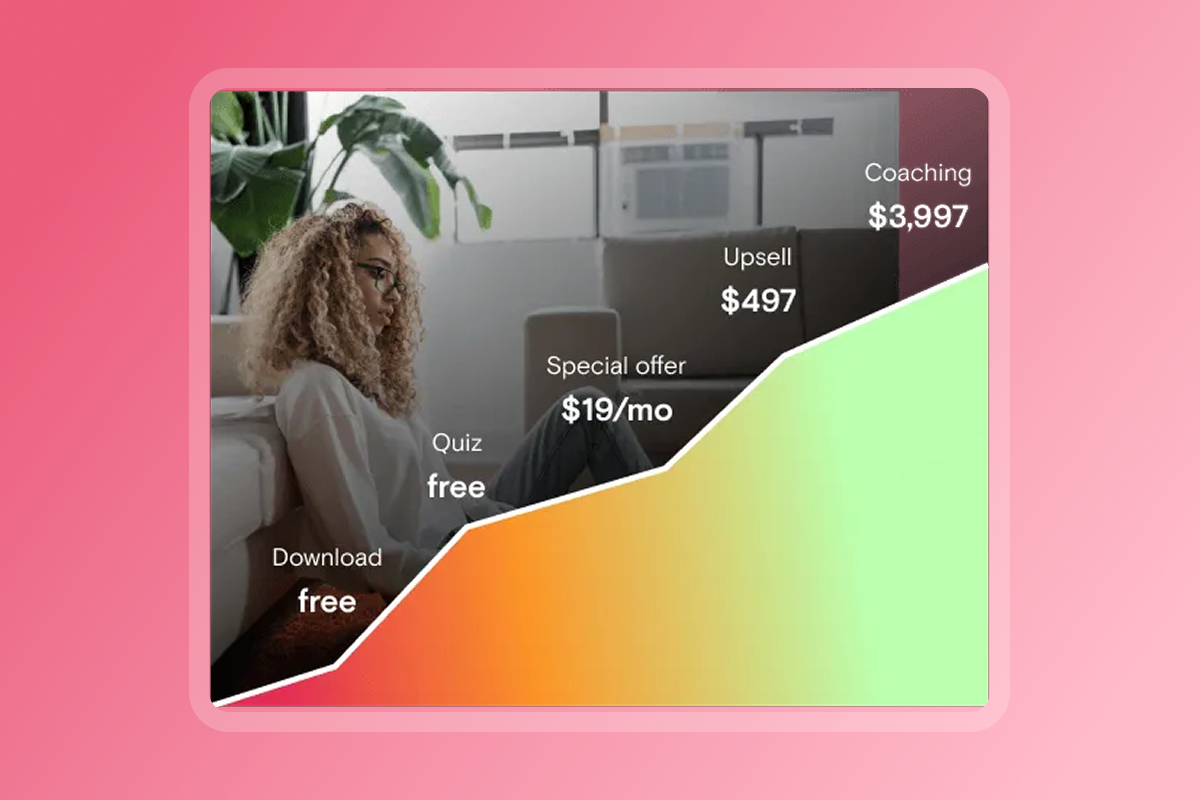
Bundles and one-time offers add flexibility. Package your community access with 1:1 coaching sessions, live workshops, or downloadable resources. Price these at $297-$997 depending on scope. One-time purchases work well for challenges that include limited-time community access.
Which community app platform is best for creators?
| Feature | Passion.io | Facebook Groups | Mighty Networks | Kajabi |
|---|---|---|---|---|
| Native Mobile App | Yes (iOS / Android) | N/A (runs inside Facebook) | Yes | Add-on |
| Push Notifications | Yes (creator-controlled) | Yes (Facebook-controlled) | Yes | Limited |
| Offline Mode | Yes | No | Limited | Yes (mobile app) |
| Course Integration | Fully integrated | No | Yes | Yes (web-first) |
| Transaction Fees |
3.9% (web via PassionPayments) 0% (external checkout) 15–30% (Apple / Google IAP) |
N/A | 1–3% by plan + payment processor | Varies by plan |
Facebook's declining organic reach makes it unreliable for paid communities. In January 2018, Facebook prioritized posts from friends and family, causing Pages and Groups to see organic reach drop by 35% on average. Your posts compete with personal updates and ads. The result is that members miss announcements about new content, live sessions, and challenges, directly harming completion and renewals.
Mighty Networks delivers native apps and strong community features. According to the Mighty Networks Help Center, transaction fees range from 3% on the Community plan to 1% on Mighty Pro plans, with processor fees added separately.
Kajabi excels as a web-first platform for funnels and email, though branded mobile apps are an add-on rather than core infrastructure. According to Dan Lok's review, Kajabi's mobile app does support offline content downloads, making it suitable for web-first businesses adding mobile later.
Passion.io positions itself for creators who want courses and community unified in one branded app from day one. The platform handles hosting, updates, and payment processing while you control content and notifications. For health and fitness professionals specifically, mobile-first delivery improves accountability because members carry workouts and check-ins in their pockets.
"This has been an incredible experience because of the guidance and direction from the videos and written content, as well as the live support from the community (via Facebook)." - Nitara Osbourne on Trustpilot
Frequently asked questions about creator apps
How long does App Store approval take?
According to Apple's official data, 90% of submissions are reviewed in less than 24 hours. Most approvals happen within 24-48 hours for new apps and 12-24 hours for updates. If Apple requests metadata changes or screenshot adjustments, you can fix and resubmit quickly.
Do I need a developer to build the app?
No. Passion.io's drag-and-drop builder handles app creation without code. You upload content, set pricing, and customize branding using templates.
What if I already use Kajabi for courses?
Yes. Passion.io integrates with third-party platforms via Zapier. You can keep Kajabi for web funnels while using Passion.io for the mobile community experience. Connect membership access by triggering Passion.io enrollment when someone purchases in Kajabi, or sync user data bidirectionally.
Can members access community content offline?
Yes. Passion.io supports offline lesson access so members can download videos and materials for viewing without data connections. Community posts require connectivity for real-time updates.
How do I moderate community discussions?
Toggle member permissions to control who can start conversations, send DMs, or post in specific channels. Build announcement channels where only admins post, or open channels for peer discussion. Zapier integrations let you receive notifications when members comment.
Key terminology for app builders
Native app: A mobile application installed from the App Store or Google Play, built specifically for iOS or Android rather than running in a web browser. Native apps perform better and access device hardware directly.
Push notification: A direct message sent to a user's mobile device from your app, appearing on lock screens even when the app is closed. Push notifications bypass email inboxes and social algorithms to drive engagement.
In-app purchase (IAP): Buying access or content through Apple's or Google's payment systems using FaceID, TouchID, or saved Google Play accounts. Apple and Google charge 15-30% transaction fees on IAP.
PassionPayments: Passion.io's integrated checkout system for web-based purchases, powered by Stripe. Charges a 3.9% platform fee plus standard Stripe processing costs.
Progressive Web App (PWA): A website that behaves like an app when saved to a home screen, but runs in a browser rather than as native software. PWAs have limited offline access and hardware integration compared to native apps.
If you're tired of fighting Facebook's algorithm while watching completion rates stall, a branded in-app community consolidates your tools and puts engagement levers back in your hands. The creators seeing 15-30% completion lifts aren't running more ads or posting more content. They're simply reaching members where they already spend time, with notifications that actually get seen. Explore Passion.io's platform demo to see the community builder in action, or join the PassionFighters community to ask creators how they migrated from Facebook in 30 days.