.png)

Updated January 26, 2026
If you run an online coaching or course business, you already know the chaos of tool sprawl. Instagram DMs for quick questions, Facebook groups for community, Zoom links for live sessions, Stripe checkouts scattered across emails - you're juggling five platforms to deliver one experience. The global e-learning market continues to expand rapidly, yet scattered tools, low completion rates, and algorithm risk hold many creators back from capturing that growth.
This guide shows you the specific mechanisms that turn a generic app into a recurring revenue engine. You'll learn the design principles that prompt action instead of passive scrolling, the notification strategies that build daily habits, and the pricing structures that balance profit margins with mobile conversion rates. We'll show you how to execute these tactics on a no-code platform without hiring developers or spending months in build cycles.
What Distinguishes a High-Performing Creator App?
A creator app gives you a specialized mobile and web application for direct audience ownership, structured content delivery, and independent monetization. The key distinction lies in moving from passive consumption (watching a video on a website) to active participation (completing a daily habit tracker in an app).
Branded mobile apps consolidate courses, community, and payments into one owned channel, with push notifications and in-app communities driving stronger engagement than email-dependent web courses. Traditional online courses see 10-15% completion rates, but programs with coaching or accountability reach 70%+ because they engineer connection and momentum rather than relying on self-motivation alone.
The shift from "rented land" to owned platform changes four core business variables. General social apps rely on algorithmic feeds, ad-based revenue, and platform-owned relationships. Creator apps give you:
- Direct subscriber relationships with zero algorithmic filtering between your message and your members
- Subscription-based monetization where you set prices, keep 84-97% of revenue (depending on payment path), and control renewal terms
- Branded experience that reinforces your authority with your logo, colors, and name on every screen
- Focused content curation rather than infinite scroll feeds that pull attention toward competitors
This solves the core problem of tool sprawl by consolidating content, community, and coaching into one icon on your user's home screen.
Design Best Practices: Build for Action, Not Just Consumption
Mobile users need "do this next" clarity rather than "watch this" libraries. The difference between passive and active design determines whether users complete programs or abandon them after the initial enthusiasm fades.
An action-first dashboard prioritizes immediate engagement through specific UI elements. Research shows that clear value messaging and focusing on essential features sets the tone for the entire user experience, with effective onboarding giving users a clear sense of your app's value and how it solves their problem or makes life easier.
Core Action-Oriented Widgets
Your home screen should highlight the current challenge or next lesson rather than a generic library view. Build these five essential components:
- Progress trackers: Visual bars or circles showing course completion, habit streaks, or milestone progress that make advancement tangible and reward consistent action.
- Next Lesson buttons: Prominent CTAs that resume users at their last stopping point, removing the friction of deciding what to do next and reducing the cognitive load that causes drop-off.
- Challenge banners: Time-bound tasks that create urgency and focus, typically featuring countdown timers and clear action steps that drive daily engagement.
- Goal trackers: Habit checklists, daily activity counters, or completion badges that gamify the learning experience and create dopamine loops around desired behaviors.
- Community activity feed: Recent posts or achievements from other users that create social proof, connection, and fear of missing out on the group momentum.
Interactive course features including quizzes, goal trackers, timers, and progress bars boost completion rates and student satisfaction by transforming passive viewers into active participants. Passion.io's drag-and-drop builder lets you customize colors, logos, and tab structures without code, while templates provide action-first layouts optimized for mobile engagement from day one.
Brief mention of clear fonts and high-contrast buttons. Passion templates include these accessibility standards by default, so you don't need design expertise to create readable interfaces.
Engagement Strategies: How to Hook Users in the First 30 Days
The first 30 days determine whether casual users become committed subscribers. Mobile apps with structured engagement see higher course completion rates compared to desktop-only courses, with LearnDash reporting 45% higher completion when creators combine mobile delivery with push notifications and in-app accountability features.
Push Notifications Drive the Difference
Push notifications represent the number one mobile engagement differentiator. Research on nudging students with push notifications shows positive effects on course completion, time management, self-regulation, and participation, particularly when notifications are sent at scheduled times during active learning periods.
The optimal cadence for active programs involves 2-3 notifications per week during challenge or cohort periods. These should not be generic "new content" alerts but habit reminders, checkpoint nudges, and celebration messages that create emotional connection. Push notifications sent at strategic times, particularly morning and evening, increased student engagement and strengthened platform interaction in mobile learning studies.
Fitness creators should send action-focused reminders that celebrate progress and create urgency. Examples include "Your warrior needs training" motivation messages, quick 10-minute mobility challenges, and weekly milestone celebrations like "You've crushed 3 workouts this week, finish strong today." Business coaching notifications work best when tied to specific daily actions like prospecting tasks, revenue goal check-ins, or focused 15-minute deep work blocks. Arts and creative coaches should emphasize habit streaks and practice reminders that keep creative momentum alive, work-in-progress sharing prompts, and technique exercises that build skill incrementally.
Push notification open rates significantly exceed email, with average email open rates below 2% while push notifications achieve 20% average open rates. Passion.io's custom notification system lets you schedule these habit-forming nudges directly from your dashboard.
Gamification and Challenges Increase Completion
Running a 30-day challenge using drip features creates structured momentum. Interactive elements boost completion rates by transforming passive viewers into active participants who feel invested in finishing what they started.
Set up challenges in your app by defining clear milestones, daily actions, and completion rewards. Examples that work include:
- 30-day skill builder: Daily 15-minute lessons with progress tracking and streak counters
- Weekly community challenges: Group accountability with shared check-ins and public commitment
- Streak rewards: Badges or unlocked content after consecutive days of participation
In-App Community Beats External Groups
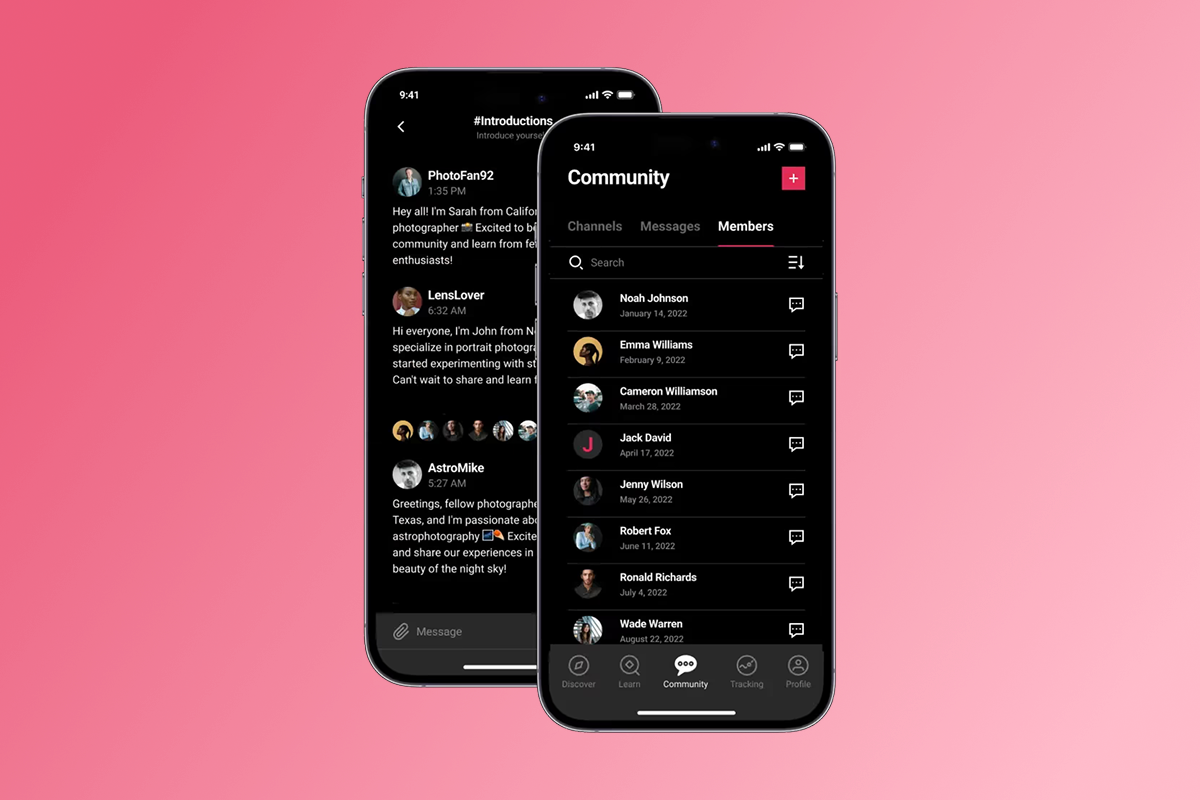
Moving conversations from Facebook Groups (distraction-heavy) to your app (focus-heavy) directly increases retention. In-app community features turn isolated learners into a loyal tribe, with paid community membership creating psychological investment and reducing dependency on platforms you don't control.
Facebook's algorithm determines if and when users see group posts, often suppressing organic reach to sell ads. Native mobile alerts reach users directly without algorithmic filtering. Harvard Business School Online saw course completion increase to over 85% after introducing social learning features, demonstrating that community connection drives program completion when engineered intentionally.
"I can't think of a better company that will deliver on the tech side of things but also really care about the impact you're going to make... Everything from how to create the best user experience, to how do you generate leads, and how do you monetize and scale your business..." - Andrew Truong on Trustpilot
Build an engaged community in your Passion.io app by creating focused channels, encouraging daily check-ins, and featuring member wins. Private, paid communities create switching costs because users' social connections and post history live inside the paid ecosystem, making cancellation psychologically harder.
Monetization Models: Choosing between Web Checkout and IAP
Transparent cost structures let you strategically balance profit margins with conversion friction. The decision between web checkout and in-app purchases (IAP) significantly impacts your take-home revenue on every sale.
Fee Structure Comparison
PassionPayments charges a 3.9% platform fee with Stripe handling payment processing at approximately 2.9% + $0.30, totaling about 6.8% + $0.30 per transaction. Apple's updated guidelines for the U.S. storefront now let iOS apps show one web checkout link with zero Apple commission, creating a hybrid opportunity where you can offer both paths.
Apple charges a 30% fee for apps and in-app purchases, with subscriptions charged at 30% for the first year, dropping to 15% for subsequent years. If your business makes $1 million or less in a year, you qualify for the Small Business Program reduction to 15% from day one. Google Play charges 15% for the first $1M/year, then 30% beyond that threshold for standard purchases, with subscriptions at 15% from day one for auto-renewing subscriptions.
The Hybrid Monetization Strategy
Smart creators use both paths strategically. At $29 per month with 100 active members via web checkout, you generate $2,900 gross revenue. After the 3.9% platform fee, you keep approximately $2,787 before Stripe processing (typically $290 + $30 in fees). That's about $2,467 net, or 85% of gross revenue.
For the same $29 monthly plan sold via Apple IAP under the Small Business Program (15%), Apple retains approximately $4.35 per subscription. The convenience of one-tap mobile purchases often justifies the higher fee for impulse subscriptions where friction is the primary conversion barrier.
Recommended approach:
- Web checkout: Core subscriptions, annual plans, high-ticket bundles where you can drive traffic via email and social campaigns with clear value propositions
- IAP: Low-friction monthly entry points, mobile upsells, convenience conversions for users who discover you through app store search
Three-Tier Pricing Structure
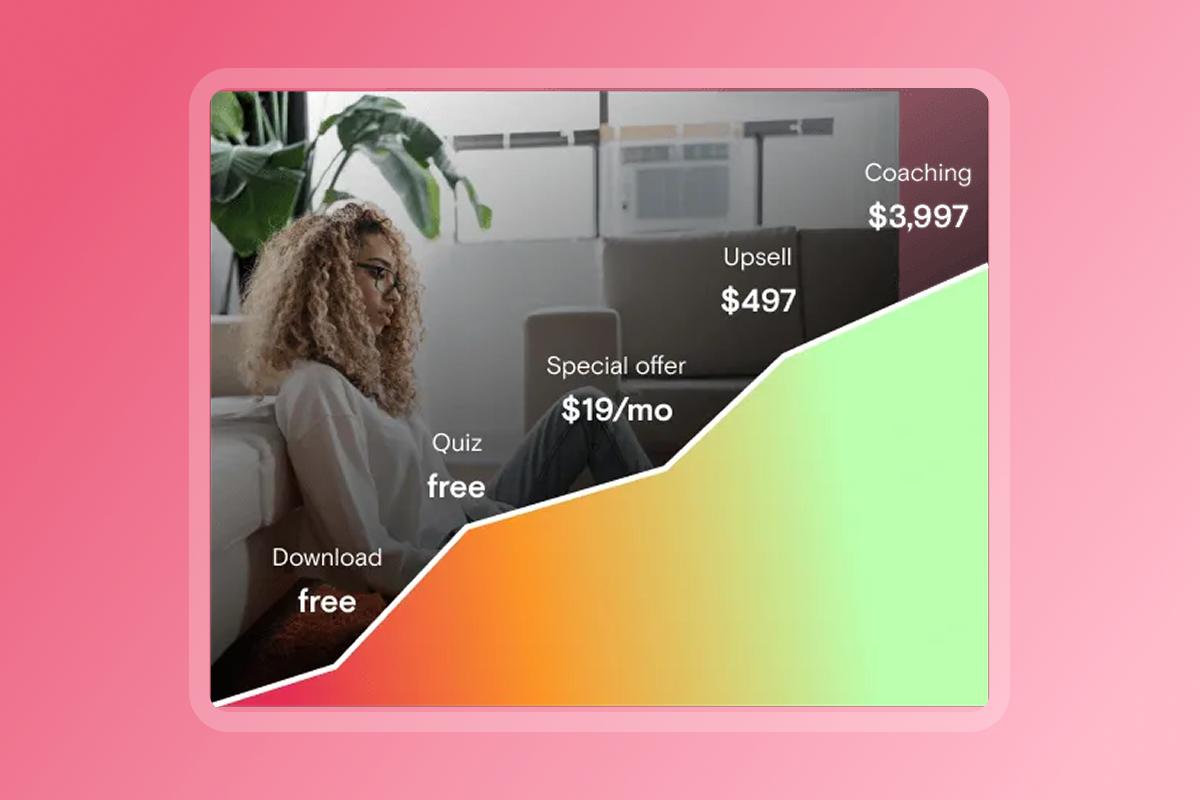
A proven ladder serves multiple customer segments while maximizing lifetime value. Three-tier pricing strategy offers products in distinct levels (Basic, Standard, Premium), helping businesses cater to different customer needs and budgets while driving the perceived value with increasing tiers to justify the increasing price point.
Tier 1 - Freemium/Lead Generation ($0 or low-cost):
- Free tier is functional but limited with usage caps, ads, fewer features, or no support
- Example features: Sample lessons or limited content library, community access (read-only or limited posting), basic resources or templates
- Purpose: Build email list, demonstrate value, create conversion path to paid tiers
Tier 2 - Core Content ($29-$49/month):
- The middle tier used for upsells, often highlighted as "most popular" or "most economical" option
- Example features: Full course library, active community participation, progress tracking, push notifications, offline access
- Purpose: Primary revenue driver, scalable MRR, serves the majority of your audience
Tier 3 - VIP/Coaching ($99-$299+/month):
- The premium-priced plan for those needing more personalized attention or advanced features
- Example features: All content plus 1-2 monthly group coaching calls, direct creator feedback on work, exclusive masterclasses, priority support
- Purpose: High-value customers, premium positioning, deeper relationships with committed members
Flexible pricing options including subscriptions, one-time purchases, and freemium models let you test different structures. Create and manage pricing plans directly in your Passion.io dashboard with the ability to hide certain plans from public view or create invite-only pricing for special cohorts.
Retention Tactics: Turning Casual Users into Subscribers
You engineer retention through deliberate onboarding, support workflows, and re-engagement campaigns. High-performing apps don't rely on luck or hope - they design specific sequences that turn casual users into committed subscribers.
The First 5 Minutes Determine Retention
Based on a survey conducted by Clutch, 72% of respondents said it was important to complete user onboarding in less than a minute, so don't overcomplicate the onboarding or turn it into an essay. Your first-session sequence should include these four essential components:
1. Welcome and value statement (30-60 seconds):
Start with a brief welcome video from you as the creator, followed by clear value messaging explaining how your app solves their problem. Effective onboarding gives users a clear sense of your app's value and how it makes life easier or helps them achieve their goals.
2. Quick win and first action (2-3 minutes):
Get users to the AHA-Moment as fast as possible, which occurs when the user experiences the value of an app for the first time. Examples include completing a first lesson snippet (5-7 minutes), introducing yourself in community with a welcome prompt, or setting your first goal with guided prompts.
3. Navigation tour (1-2 minutes):
Interactive walkthroughs are one of the best ways to teach core features, allowing users to try actions directly which reduces confusion and speeds up learning. Point out the Lessons tab, Community, Progress tracking, and Settings with contextual hints that explain features only when first used.
4. Permission requests (as needed):
Focus on essential features that deliver early value, requesting access to device features like camera or location only when needed with brief explanations of why each permission is required. Push notification opt-in deserves clear benefit statements like "Get daily reminders to stay on track" rather than generic "Allow notifications" prompts.
User retention increased by 50% after introducing proper user onboarding in case studies, demonstrating that first-impression design directly impacts long-term subscription revenue. Welcome to your Passion app with templates that guide new users through their first experience.
Support as Retention Strategy
The quality of support directly impacts retention rates. When users hit friction points and can't get help, they churn. Use custom notifications to proactively address common questions before users get stuck, and create a dedicated support tab inside your app that keeps users in your ecosystem rather than forcing them to email or search external help docs.
"Our support team has been so helpful and personable from day one. We really appreciate our CSM, Connor, who has been so quick to respond to any questions we may have, making this experience so informative and smooth." - Angie on Trustpilot
Churn prevention workflows
Track your audience's app movements using analytics to identify disengagement patterns like consecutive days without login, lessons started but never finished, or community lurking without participation. Send targeted re-engagement push notifications to users who haven't logged in for 7 days with specific, personalized prompts:
- "We miss you! Your progress is waiting - pick up where you left off in Module 2."
- "Your community shared 12 new wins this week. Check them out and add yours!"
- "Quick reminder: You're 40% through the program. Finish strong this week and unlock your completion badge!"
Your 90-Day Launch and Growth Plan
A structured timeline turns the abstract concept of "launching an app" into concrete milestones with clear acceptance criteria and realistic expectations.
Days 1-30: Build Phase
Week 1-2:
- Select template and customize branding (logo, colors, fonts, welcome screen)
- Upload 10 core lessons with videos, PDFs, and resources that represent your best content
- Create and manage pricing plans (monthly, annual, freemium tiers)
- Set up PassionPayments and Stripe integration for web checkouts
Week 3-4:
- Configure community channels and categories with clear guidelines and welcome posts
- Review what to do before submitting your app to stores
- Apply for Apple Developer Program ($99/year) and Google Play Developer ($25 one-time)
- Launch web app to small test group (10-20 people) for feedback
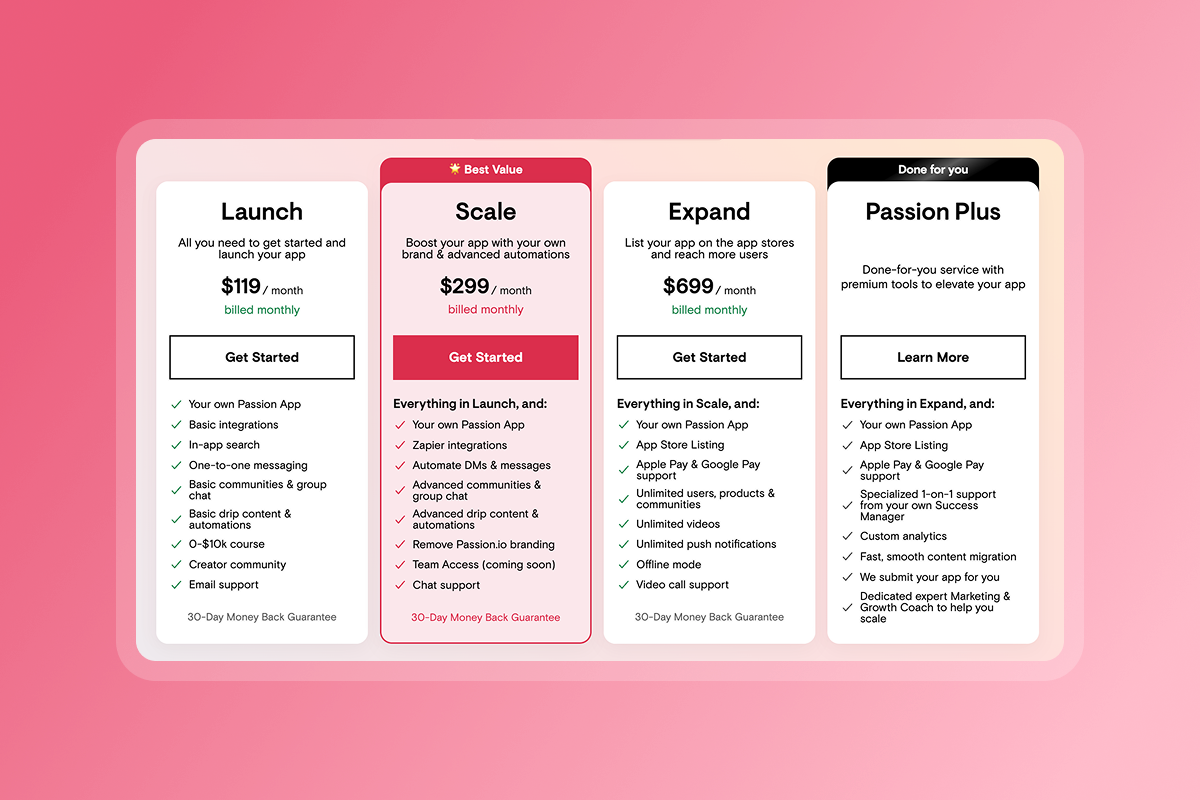
Timeline reality: Web apps launch in 1-2 weeks on all Passion.io plans, with Expand and Plus plans including submission support while Launch and Scale provide documentation for DIY submission. App store submissions typically take 1-3 weeks for initial review, so plan accordingly.
Days 31-60: Launch Phase
Week 5-6:
- Submit to Apple App Store and Google Play Store with complete metadata and screenshots
- Applications typically take 24-48 hours for initial assessment, with 90% reviewed within 24 hours
- If Apple requests clarifications about review guidelines, follow the documented response process
- Launch marketing campaign to existing email list with clear value proposition and download links
Week 7-8:
- Onboard first cohort (target: 50 founding members with special pricing or bonuses)
- Send welcome series via push notifications (Days 1, 3, 7 pattern)
- Host first live Q&A or community event to build momentum and connection
- Monitor analytics: daily active users, lesson completion rates, time in app, community posts
Cost summary: Budget $124 in your first year, then $99 annually to maintain Apple presence. Passion.io Launch plan starts at $99/month billed annually ($119/month monthly billing).
Days 61-90: Grow Phase
Week 9-10:
- Launch first 30-day community challenge with clear goals, daily actions, and completion rewards
- Implement 2-3 push notifications per week cadence during active challenge periods
- Analyze completion data and adjust content pacing based on where users drop off
- Test different notification timings (morning vs evening) and messages (motivational vs informational)
Week 11-12:
- Introduce Tier 3 VIP offering with coaching calls or exclusive content
- Survey members for feature requests and pain points using in-app polls or forms
- Optimize onboarding based on drop-off points identified in analytics
- Plan next content release and challenge with lessons learned from first cohort
Success metrics: Most creators complete migration in 2-3 weeks, moving 10-15 most popular lessons, setting up community channels, and connecting Stripe accounts. Focus on improving lesson completion rates and reducing monthly churn below 6% as your primary retention indicators.
"Setting up my coaching app on Passion.io has been one of the easiest and most intuitive processes I've experienced. The platform walks you through every step with clarity, making what could be a complicated process feel smooth and manageable..." - Everchanging Butterfly on Tustpilot
The Three Pillars of App Success
A successful creator app requires you to balance design, engagement, and monetization as interconnected systems. When you optimize one pillar in isolation, you often weaken another - the goal is coherent integration across all three.
Design for habits, not consumption. Your dashboard should answer "what do I do next?" within 3 seconds of opening the app. Progress trackers, challenge banners, and "continue" buttons create action-first experiences that keep users moving forward instead of passively browsing a content library they never finish.
Engage via push and community. Mobile apps with push notifications drive higher engagement because active engagement mechanisms create habit loops that email newsletters can't match. Schedule 2-3 habit-forming push notifications weekly while building community accountability through challenges and shared wins. In-app communities reduce platform risk and increase switching costs because users' social connections live inside your paid ecosystem.
Monetize with strategic flexibility. Use web checkout for margin-sensitive offers (3.9% platform fee plus Stripe) and in-app purchases for low-friction mobile conversions (15-30% store fees depending on your revenue tier). A three-tier pricing structure ($0, $29-49, $99+) serves multiple customer segments while maximizing lifetime value through clear upgrade paths.
No-code platforms like Passion.io let you launch in weeks without developers, eliminating the $80,000-$250,000 cost and 6-12 month timeline of custom development. The 30-day money-back guarantee gives you a risk-free window to test the platform.
Ready to own your audience? Book a platform demo to see the drag-and-drop builder, push notification system, and flexible monetization in action, or explore case studies from health and fitness professionals who scaled from tool sprawl to six-figure apps.
Frequently Asked Questions
Do I need a developer to build a creator app?
No, Passion.io is a no-code platform with drag-and-drop builders and templates. Expand and Plus plans include app store submission support while Launch and Scale provide DIY documentation.
How much does Apple take from my sales?
15-30% for in-app purchases depending on your revenue tier, but 0% if sold via web checkout. U.S. apps can now include one web checkout link without Apple commission.
Can I migrate students from other platforms?
Yes, via bulk email import, direct invite links, and content uploads. Most creators complete migration in 2-3 weeks.
What's the realistic timeline to launch?
Web app live in 2-3 weeks, mobile apps submitted by week 4-6. Most reviews complete within 24-48 hours.
How do push notifications improve completion?
Research shows push notifications increase engagement by creating habit loops and reducing reliance on email, with LearnDash reporting 45% higher completion when combining mobile apps with push and accountability.
Key Terminology
Push Notification: A clickable message sent directly to a user's mobile home screen, bypassing email and social algorithms to create immediate, friction-free engagement opportunities.
IAP (In-App Purchase): Buying digital goods directly through the Apple App Store or Google Play Store, with fees ranging from 15-30% depending on revenue tier and subscription renewal period.
Churn Rate: The percentage of subscribers who cancel within a given period, typically measured monthly or annually, with healthy creator apps targeting below 5% monthly churn.
PassionPayments: Passion.io's native web checkout system charging a 3.9% platform fee plus Stripe's standard processing, giving you higher margins than in-app purchases.
MRR (Monthly Recurring Revenue): Predictable monthly income from subscription-based pricing models, replacing launch-dependent cash flow spikes with stable, forecasted revenue streams.