


Live Streaming in Community Apps: Setup & Engagement Guide
Updated February 23, 2026
TL;DR: Moving live streaming into your branded Passion.io app cuts operational drag and increases recurring revenue by giving you full control over notifications, data, and member experience. YouTube integrates directly with Passion.io courses. Launch with DIY setup in 4–8 weeks or use White-Glove (Plus) service for done-for-you deployment in 30 days. Push notifications drive 3x higher retention rates compared to email reminders. Web checkout costs 6.8% total (PassionPayments 3.9% plus Stripe), while in-app purchases cost 15–30% to Apple or Google. You own and export your subscriber list anytime.
Creators earning mid-five to six figures monthly manage an operational mess: three separate platforms. Members navigate three platforms to access your offerings, creating friction that drives churn. This guide shows you how to consolidate live streaming into a single branded app, the exact technical setup required, and the White-Glove path for time-poor creators who want deployment handled for them.
Why consolidate live streaming into your branded app
Tool sprawl creates "operational drag," the loss of revenue and creative capacity caused by managing multiple disconnected platforms. When your courses, community, payments, and reminders live in four different places, managing access over creating. Data silos block efficient use, and 75% lose 6–15 hours weekly due to tool sprawl. For creators, this translates to hours spent managing disparate systems instead of creating content.
Data shows notification-driven retention beats email-only reminders across every cohort. 3x higher retention rates are seen among app users who receive push notifications in their first 90 days compared to those who received none, while 2–5x higher retention rates result from weekly push notifications. A fitness coach who moved her 30-day challenge into her app saw completion jump 22% in weeks. You own the notification channel with your branded app, which means you control when and how you reach your audience.
"Passion.io have been so supportive in helping me develop my App, the training, customer support (especially Hope) have been second to none! I highly recommend them if you are thinking of developing an App. They guide you through the process every step of the way." - Karen on Trustpilot
How Passion.io compares to Discord and Zoom for paid communities
Discord works well for casual chat but falls short for creators building premium, branded experiences with structured learning. Zoom handles video calls but offers no persistent community space or content library. Here's how Passion.io stacks up for paid community live streaming.
| Feature | Passion.io | Discord | Zoom |
|---|---|---|---|
| Branding | White-label app branding options | Server banners but members join "Discord" | Zoom branding on all meetings |
| Data Ownership | Export your subscriber list | Limited export under Discord's Terms | Limited data export |
| Monetization | PassionPayments 3.9% plus Stripe (6.8% total) or 15–30% IAP | Server Subscriptions with platform fees | Requires external payment processing |
| Mobile Experience | Push notifications and offline access | Mobile app branded as Discord | Mobile app for meetings only |
| Live Streaming | YouTube integrates directly with courses | Screen sharing and Go Live features | Native video conferencing |
| Content Delivery | Centralized content library | Limited to file sharing in channels | Screen sharing during meetings |
You own the relationship with Passion.io, while Discord and Zoom remain intermediaries. With Passion.io, export names, emails, subscription status at any time. That platform dependency creates risk when policies change or algorithms shift.
"Passion.io has given us the opportunity to create an app which would not have been possible without their daily guidance and support. We recommend passion.io for anyone looking to take their new or existing biz online." - Natasa and Angelina on Trustpilot
How to set up live streaming in your Passion.io app
At this time, YouTube is the only integration with Passion.io for live streaming. You'll need a verified YouTube channel with live streaming activated, which can take up to 24 hours after verification.
Phase 1: YouTube Live setup
1. Start your YouTube Live stream
Click on the camera symbol with a plus sign at the top right corner of your YouTube Home Page, then click Go Live. Once you start the Live stream, press the share button at the top right corner and copy the Video link that starts with "https://".
2. Test your bandwidth and set up equipment
You need 6-8 Mbps upload speed for 1080p at 30 fps, but add a 35-40% buffer to handle fluctuations (aim for 8.4 Mbps minimum). Test at your stream time because bandwidth varies. Connect via ethernet instead of Wi-Fi to reduce interruptions. Use an external USB microphone and three-point lighting or ring light to eliminate shadows.
Smartphones work for livestreams, so adequate lighting, stable internet, and sufficient battery life matter most.
Phase 2: Embedding in Passion.io
1. Navigate to your Courses section
Navigate to your Courses section and choose the course where you want the live stream to appear.
2. Create a new lesson
Click on the + icon to add more content, choose Lesson, and add the details for the lesson, including which section to place it. We recommend you dedicated live stream course so your clients can easily find where to go to see you live.
3. Add the YouTube video widget
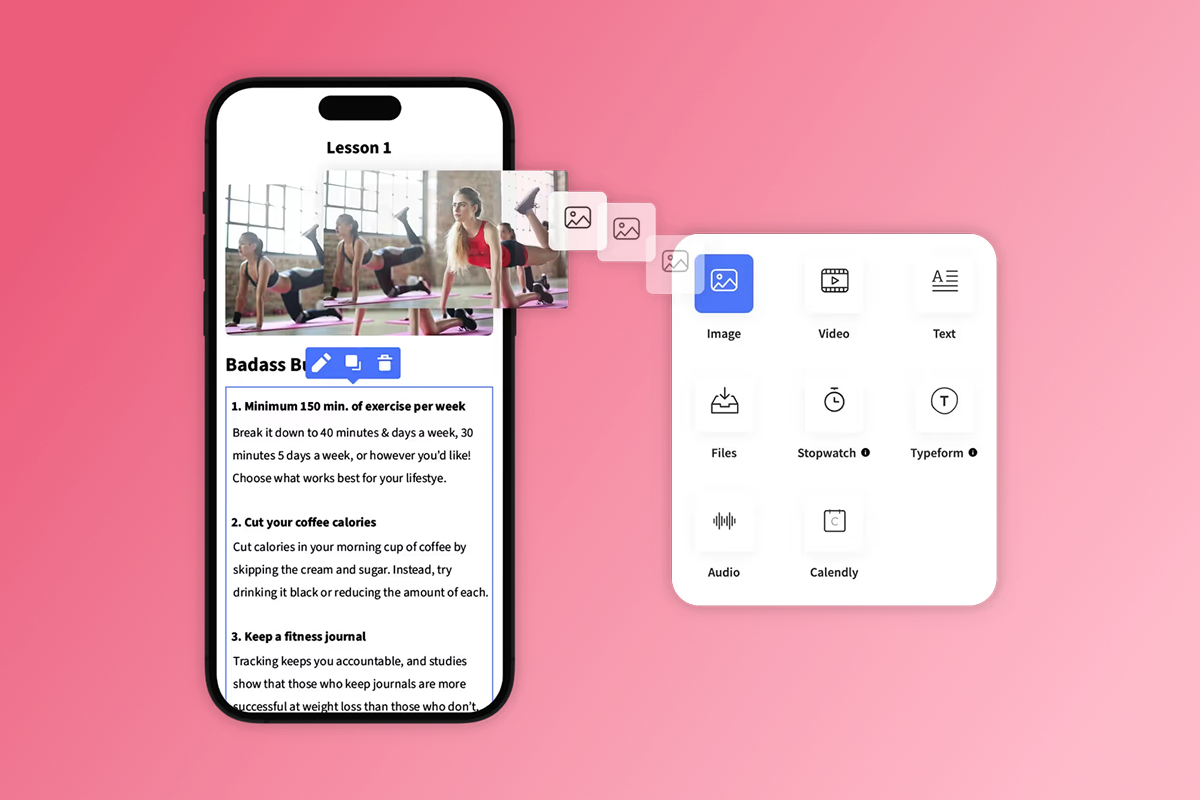
Click Add Content, click on the widget to add a video, paste your YouTube live stream URL in the Video link field, and click Add Video. The YouTube stream will now embed directly in your course, visible on web, iOS, and Android apps.
4. Post-stream workflow
Recordings don't upload automatically. Download from YouTube and upload manually if you want offline access. We cover the full repurposing workflow in "How to repurpose live streams" below, where you can turn one stream into multiple marketing touchpoints.
Phase 3: Push notification setup
Configure push notifications here by logging in to your Web App and opening Admin View. Navigate to More, then Custom Notifications, and click Create New to add a Title and Text for your notification. You can target users who signed up but haven't purchased a plan, users who haven't completed a lesson for a set number of days, or users who haven't opened your app for a set number of days.
For live stream announcements, you'll manually trigger notifications before you go live. Launch plan notification limit is 1,000 notifications per month, and higher tiers increase or remove the cap. You can also automate notifications via Zapier when new content is added.
Common technical issues and fixes
Stream buffering or freezing: Test your connection at the same time of day you'll typically stream because bandwidth varies. If viewers report buffering, drop your resolution from 1080p to 720p in YouTube Live settings, which cuts bandwidth requirements from 6 Mbps to 3-4 Mbps.
Audio delay or echo: Disable laptop speakers during streams and use headphones to prevent feedback loops. If echo persists, mute all participants by default and unmute only during Q&A segments.
YouTube stream not appearing in Passion.io: Copy the direct video link from your YouTube share menu, not the channel or watch page URL. The lesson widget requires the direct video link to embed correctly.
Push notification not delivering: Custom Notifications can take 2-5 minutes to send. Send your "Going Live in 15 Minutes" notification 20 minutes before start time to ensure delivery. Users must have notifications enabled in device settings.
Recording not saving: The recording will not automatically upload to the Passion.io library.
"I've only just started with Passion.io and I love the break down into units idea. The support is quite brilliant because of the online community and such a feeling of goodwill." - T Calver on Trustpilot
Live engagement tactics that drive retention
Live sessions create exclusivity, real-time interaction, and FOMO, which drives higher perceived value. A fitness coach who moved her 30-day challenge into her app saw lesson completion jump 22% in 9 weeks because push notifications and live check-ins created a habit loop. The tactics below turn passive viewers into active participants, which builds retention.
Five live event templates you can copy
Monthly Q&A (60 min): Members submit questions 48 hours in advance via community. Send push notification 15 minutes before start. Answer top 5 questions (30 min), one hot seat coaching session (20 min), open Q&A (10 min). Record and upload as "Monthly Q&A [Month Year]" lesson.
Workshop format (90 min): Teach one framework or process (45 min), show screen-share demo (20 min), breakout reflection prompt in community (15 min), Q&A (10 min). Promote as one-time purchase at $97 via web checkout for higher margins.
Hot seat coaching (45 min): Pre-select 3 members who submitted applications. Dedicate 12 minutes per person to solve their specific problem live. Other members watch and learn. High perceived value creates urgency for next session.
Group accountability check-in (30 min): Run during active challenges. Members share progress (15 min), you provide feedback and course corrections (10 min), set next week's milestone (5 min). Push notification 2 hours before: "Accountability call starting soon."
Special guest interview (60 min): Invite expert in your niche for 40-minute interview, 20-minute member Q&A. Reserve for Premium tier only to drive upgrades. Promote 7 days in advance with guest bio and topic. Repurpose into 6-8 social clips.
Proven engagement tactics
Q&A and hot seat coaching: Run monthly Q&A sessions where members submit questions in advance via your in-app community channels. During the live stream, answer the top five questions and offer one member a 10-minute hot seat where you solve their specific problem in real time. Track DAU/MAU (daily active users divided by monthly active users) on live event days. You should see a spike in DAU when you send a push notification 15 minutes before going live.
Shoutouts and member spotlights: Call out members by name during your stream. This recognition keeps members engaged and active because they know you see their progress. Members who get spotlights are more likely to share the moment on social media, which brings organic reach back to your app.
App-only exclusivity: Reserve certain live workshops for higher tiers only. We call this the "Velvet Rope" effect, where members upgrade to access exclusive live events. Promote these exclusive sessions in your community feed with a clear CTA: "Upgrade to Premium to join this workshop." Tiered memberships and paywalls with strategic paywalls.
In-stream challenges and accountability: Run a live 30-day challenge where members complete daily tasks and report progress in the community. Fitness and wellness creators report 15-30% higher completion rates within 90 days. Push notifications twice weekly remind members to check in, and the combination of live check-ins plus push nudges creates a habit loop that reduces churn.
"Absolutely LOVE the Passion.io app platform. Everything you need to build and launch your app. They make it so easy and customer support is awesome!" - Shannon Reissman on Trustpilot
Monetizing live streams: Tiers, bundles, and IAP strategies
Your pricing determines which payment path makes sense. PassionPayments web checkout fees (about 6.8% total) for web sales, while Apple and Google IAP fees. Creators earning under $1M annually typically qualify for the 15% small business rate.
Strategy 1: The "Velvet Rope" for higher tiers
Offer live access only for Premium or VIP tiers. Compare net revenue on a $297 annual membership:
- Web checkout: $297 - $20.22 (6.8% fees) = $276.78 net
- Apple IAP: $297 - $44.55 (15% fees) = $252.45 net
- Savings per member: $24.33 by routing to web
At 100 annual members, you save $2,433 by routing core subscriptions to PassionPayments web checkout. Reserve in-app purchases for low-ticket items ($5-$29) where one-tap Apple Pay boosts conversion.
Strategy 2: One-time purchase workshops
Run a standalone workshop priced at $97 and offer it as a one-time purchase via web checkout. Promote the workshop on social media with a link to your web app checkout page. After the live event, convert the recording into an on-demand lesson and keep it available for sale.
Strategy 3: Repurposing live content into paid "Vault" bundles
Record all your live sessions and bundle them into a "Workshop Vault" offer at $497. Members who missed the live events can purchase the vault and binge the replays. This strategy turns perishable live events into durable assets that generate passive income.
On Scale, Expand, and Plus plans, Passion charges 0% platform fee when you process payments through external platforms like ThriveCart or SamCart and grant app access via Zapier.
| Price Point | PassionPayments Net (6.8%) | 15% IAP Net | 30% IAP Net |
|---|---|---|---|
| $29 | $27.03 | $24.65 | $20.30 |
| $97 | $90.40 | $82.45 | $67.90 |
| $297 | $276.78 | $252.45 | $207.90 |
How to repurpose live streams into on-demand content
Don't let content die after the stream. Each live event can generate multiple touchpoints across your marketing funnel while building your on-demand content library.
Step 1: Export and edit
The recording will not automatically upload to the Passion.io library, so download the full recording from YouTube Creator Studio. Use a simple editing tool (iMovie, DaVinci Resolve, or CapCut) to trim the pre-stream countdown and post-stream wrap, remove any technical difficulties or dead air, and add intro/outro cards with your branding. Create 60-90 second highlight clips for social promotion.
Step 2: Upload as on-demand lesson
Go to Courses from your App, Web App, or Passion.io App, choose the course, click on the + icon to add more content, choose Lesson, and upload the edited full replay. Title it clearly: "Workshop Replay: [Topic] - [Date]." Add timestamps in the description for key segments.
Step 3: Notify your community
Log in to your Web App and open Admin View, navigate to More, then Custom Notifications. Click Create New and send a push notification: "Missed the live? Replay now available: [Session Title]."
Step 4: Distribute highlight clips
Post 60-90 second clips to Instagram Reels, TikTok, and YouTube Shorts with a CTA: "Watch full replay in the [Your App Name] app." Drive traffic back to your Passion.io app for the complete session.
Step 5: Organize replays in your Live Sessions course
Add all replays to the Course dedicated to your Live stream you created during setup. Organize by month or topic so members can catch up on sessions they missed.
You'll spend 30-60 minutes per live stream on the basic workflow (Steps 1-5). Advanced repurposing, where you transcribe the session into blog posts, design Instagram carousels from main takeaways, and extract audio-only versions for podcast distribution, provides comprehensive multi-channel distribution.
"Passion.io makes it simpler to launch a new business or to grow the one you have. I like how we are fed in small bites so that we are not overwhelmed." - Roger Nicholas on Trustpilot
Should you use DIY setup or White-Glove Service
Time-poor creators with established audiences face a decision: handle the technical setup yourself or pay for done-for-you deployment. Your choice depends on your current revenue, available time, and tolerance for technical troubleshooting.
DIY path: Launch and Scale plans
Launch plan pricing is $99 on annual, $119 on monthly. Scale is $239 annual, $299 monthly. You handle app building, content upload, and submission to Apple and Google yourself. Web apps live in 2–3 weeks, and App Store submissions typically start by week 3-4, with most creators fully published across iOS, Android, and web within 4-8 weeks.
You'll need to open Apple and Google developer accounts ($99/year for Apple, $25 one-time for Google) and follow the submission process. Passion.io provides step-by-step guides, and the PassionFighters community offers peer support where other creators share tips and troubleshooting advice.
White-Glove path: Expand and Plus plans
Expand plan pricing. Plus plan pricing depending on scope. On the Plus plan, dedicated success manager support, from connecting your developer accounts to addressing reviewer feedback.
Our team builds your app, handles content migration, manages App Store submission, and provides a dedicated success manager. Rejection guidance and resubmission. We typically respond within two business days, often sooner, and prioritize quick resolution and resubmission. Target timeline: launch in 30 days or less with Passion Plus.
What you provide:
- Content files (videos, PDFs, etc.)
- Brand assets (logo, colors, fonts)
- Course structure and organization preferences
- Developer account credentials ($99/year Apple + $25 one-time Google)
What we handle:
- Developer account connections
- App building and design implementation
- Content upload and organization
- Apple App Store submission
- Google Play Store submission
- Reviewer feedback responses
- Resubmission after rejections
Note on live streaming: Plus handles app setup and YouTube embed configuration, but you'll run your own YouTube Live streams following the process in this guide. We don't operate your camera or produce your broadcast.
"Best Decision I Made Signing Up for Passion.io... Incredible support, constant innovation, a step by step guide so you can follow the process, and the best FB community I have ever belonged to." - Lori on Trustpilot
Security and data ownership protocols
Data security and ownership matter when you're migrating your entire community and revenue model into a single platform. Here's what you need to know about Passion.io's protocols and your rights as a creator.
Data ownership and export rights
Passion.io Terms of Service, "AUTHOR RETAINS OWNERSHIP OF ALL AUTHOR CONTENT". Any content you submit, post, or display remains your intellectual property. Practically, this means export your subscriber list anytime, including names, emails, and subscription status.
three practical data rights: Export rights (download your user list whenever you want), Direct communication (reach your audience through email or push notifications outside the platform), and Portability (take your data with you if you leave the platform or switch tools).
Security infrastructure
two-step verification security, password and physical security measures to safeguard the Service against loss, theft, misuse, or unauthorized access. SSL-secured URLs and APIs, and enterprise cloud server hosting to guarantee security. For payments, Stripe-powered payment processing, which is PCI DSS Level 1 compliant.
Recommended security practices
- Enable 2FA on your Passion.io account immediately
- Export subscriber data quarterly as a backup
- Review privacy policy with your legal team if handling sensitive data
- Do not collect protected health information (Passion.io is not HIPAA compliant)
- Use strong, unique passwords and update them every 90 days
ROI and Total Cost of Ownership
Your consolidation decision balances cost against ownership value, time savings, and retention improvement. Here's how Passion.io stacks up against custom development over one year.
Passion.io Total Cost of Ownership (Year 1)
Launch Plan costs:
- Annual subscription: $99/month × 12 = $1,188
- Apple Developer fee: $99/year
- Google Developer fee: $25 one-time
- Year 1 Total Platform Costs: $1,312
Transaction fees (variable):
- PassionPayments web checkout fees for web sales
- For $5,000/month revenue via web: about $340/month ($4,080/year)
- Total Year 1 (with $5k/mo revenue): $5,392
Time to market:
Fully published in 4–8 weeks.
Custom Development Total Cost of Ownership
The average cost to develop a creator app with courses, community, and payments is $80,000, plus $12,000-$20,000 annually for maintenance. Add hosting ($3,000/year) and developer fees ($124).
Year 1 Total for Custom Dev: about $89,124
Savings and strategic advantages
Passion.io provides $83,732 saved in the first year. Beyond direct cost savings, revenue 3–5 months earlier because Passion.io launches in 4-8 weeks versus 4-6 months for custom development.
The retention advantage compounds the savings. 3x higher retention rates, and 15–30% higher completion rates. If you have 500 members at $29/month, a 15% churn reduction saves you $2,175 in MRR, or $26,100 annually.
| Cost Component | Passion.io (Year 1) | Custom Development (Year 1) |
|---|---|---|
| Initial Setup | $1,312 | $80,000 |
| Ongoing Platform | Included | $6,000 |
| Infrastructure | Included | $3,000 |
| Transaction Fees | $4,080 (on $60k revenue) | $4,080 |
| YEAR 1 TOTAL | $5,392 | $89,124 |
Next steps
Stop renting your community's attention on Discord and Zoom. Book a Plus demo and launch your branded app with white-glove support in 30 days, or start a free 30 day money back guarantee trial. Test YouTube Live integration and push notifications yourself. Download our Live Streaming Setup Checklist for the complete technical requirements and pre-launch testing protocol.
Frequently asked questions
Can I use Zoom inside the Passion.io app?
You can embed Zoom sessions within courses by sharing the meeting link in your community or lesson description, but it won't integrate natively like YouTube Live does.
Does Passion.io take a cut of my live stream ticket sales?
PassionPayments web checkout fees are 3.9% plus Stripe fees (about 6.8% total). Apple and Google IAP fees are 15-30% for in-app purchases, but we do not add a platform fee on top of IAP.
What happens if my internet cuts out during a live stream?
Since YouTube is the only integration with Passion.io for live streaming, the stream will buffer for viewers and attempt to reconnect if your connection is restored quickly. Add a 35–40% bandwidth buffer to prevent disconnections.
How many push notifications can I send per month?
The Launch plan includes 1,000 notifications per month, and higher tiers increase or remove the cap entirely.
Can I export my member list if I decide to leave Passion.io?
Yes, you can export your subscriber list at any time through the Users section, including names, emails, and subscription status. You retain 100% ownership of your content and member data.
Does the Plus plan include live streaming setup?
Plus is done-for-you service starting around $10,000-$20,000 where our team handles app building, content migration, and App Store submission. We configure the YouTube embed in your courses, but you'll run your own YouTube Live broadcasts following the technical setup in this guide.
Key terminology
White-Glove Service: Passion.io's premium support tier where dedicated success manager support, allowing time-poor creators to launch in 30 days or less without managing technical details.
Operational Drag: The loss of revenue and creative capacity caused by the friction of managing multiple, disconnected tools for community, courses, and engagement, forcing creators to spend more time managing access than creating, directly impacting retention and lifetime value.
Tool Sprawl: The chaotic accumulation of disconnected platforms for content delivery, community management, live events, and payments, resulting in fragmented experience and increased churn as members navigate multiple logins, interfaces, and communication channels.
PassionPayments: Passion.io's integrated web checkout gateway that processes subscriptions, one-time purchases, and bundles outside of Apple and Google app stores, giving you lower transaction fees (3.9% plus Stripe) and faster payout cycles compared to in-app purchase systems.
DAU/MAU: Daily Active Users divided by Monthly Active Users, a retention metric that measures what percentage of your monthly user base engages with your app each day. Higher DAU/MAU indicates stronger engagement and lower churn risk.