


How Fast Can You Launch a Creator App? 30-60 Day Roadmap Explained
Updated January 26, 2026
Building a custom app used to mean hiring a development team, budgeting six figures, and waiting six months. Today, if you have content ready and choose a creator-specific platform, your focus and Apple's review queue dictate the timeline, not code. I've mapped the realistic schedule from setup to App Store submission so you can stop planning and start earning recurring revenue in your own branded app.
How Long Does It Take to Build a Creator App? (Realistically)
The timeline depends entirely on the path you choose. Custom development, generic app builders, and creator-specific platforms operate on completely different schedules and budgets.
Custom development costs $80,000 to $250,000 and takes up to 12 months. You hire a team with Swift and Kotlin skills, manage sprints, and pay ongoing hourly rates of $70 to $180+ for maintenance and updates. This path makes sense if you need bespoke workflows or enterprise compliance, but it is a non-starter for most solo creators or small coaching businesses.
Generic no-code builders like Adalo and Glide run $300 to $1,000 annually. Adalo's pricing starts at $36/month for a starter plan and $52/month for professional features. These tools work well for custom tools or internal apps, but they lack creator-specific features like drip courses, challenges, and integrated community channels. You build the structure from scratch, and realistic setup time for a creator app with subscriptions and content delivery runs several weeks to months.
Creator-specific platforms like Passion.io cost $99 to $599 per month and deliver your web app in 2 weeks, with app store listings following in another 2 to 6 weeks. You drag in videos, set pricing tiers, and publish. The platform handles hosting, updates, and app store submission support depending on your plan.
The roadmap below assumes you choose a creator platform, have content ready or nearly ready, and start developer accounts immediately.
The 30-60 Day Launch Roadmap: A Week-by-Week Breakdown
This is not a vague creative project. Treat it like a sprint with daily outcomes and concrete milestones.
Week 1: Strategy, Branding, and Developer Accounts
By Day 7, you should have developer accounts submitted, branding locked in, and a content outline listing your core program. Here is how to get there.
Day 1 starts with the administrative setup that takes the longest to verify. Open your Apple Developer Account (individual or organization) and your Google Play Developer account immediately. Apple charges $99 per year and approves individual accounts in 3 to 5 business days. If you register as an organization, you need a D-U-N-S number, which according to Apple's official documentation can take up to 5 business days from Dun & Bradstreet. However, D&B states normal processing can take up to 30 business days. Plan for 10 to 14 days total for organization accounts. Google Play charges a one-time $25 fee and approves faster.
While those accounts verify, make your branding decisions. Choose your app name, pick 2 to 3 brand colors, and upload a logo. In Passion.io's builder, you customize these in the branding tab without design software. Commit to a clean, simple look you can refine post-launch.
Map your core content this week. Identify one flagship course or program. You can add modules and challenges after launch. The goal is functional value, not exhaustive libraries.
"Build an app with ease...in a short amount of time!" - Angie on Trustpilot
Week 2: Content Migration and App Structure
Your goal this week is to upload your core program, structure it into lessons, and make it visible in the app preview by Day 14.
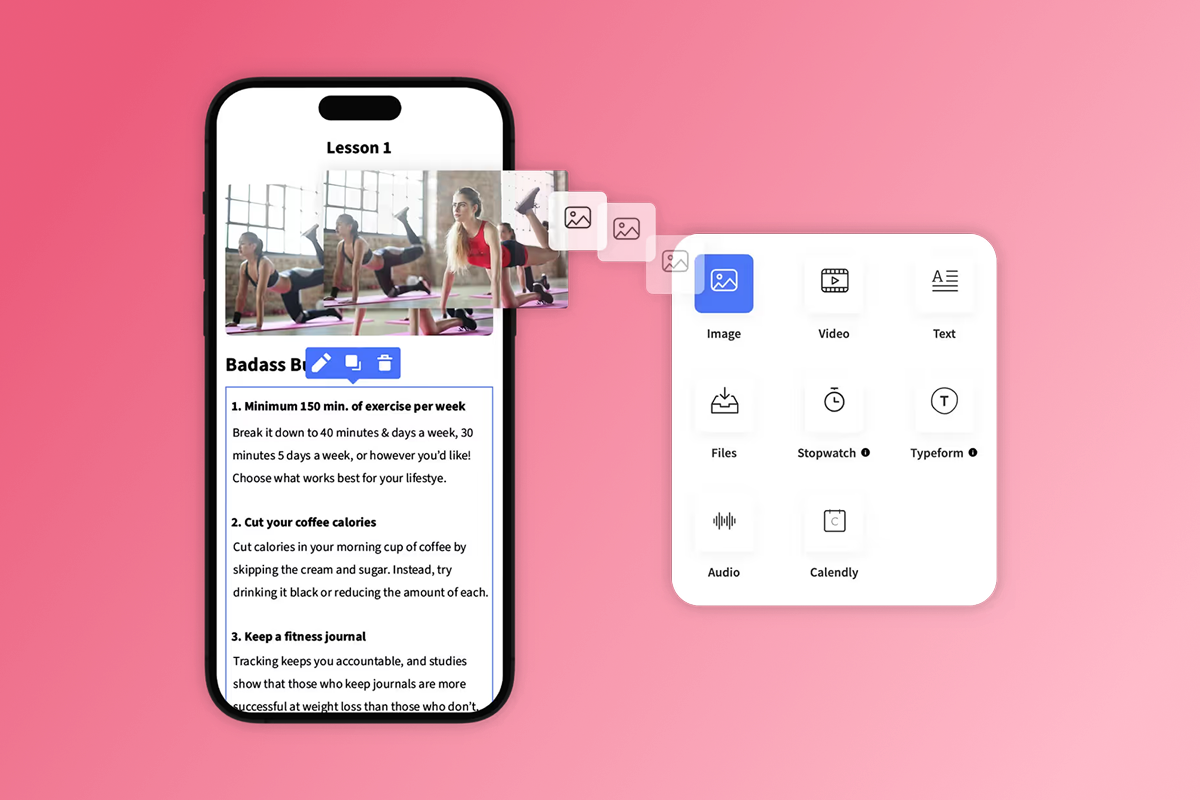
Passion.io's drag-and-drop course builder accepts video, audio, PDFs, and text. You structure lessons into sections, add progress tracking, and set drip schedules if you want to release content over time. The builder supports casting to any screen and offline playback, so members can download lessons for travel or gym sessions.
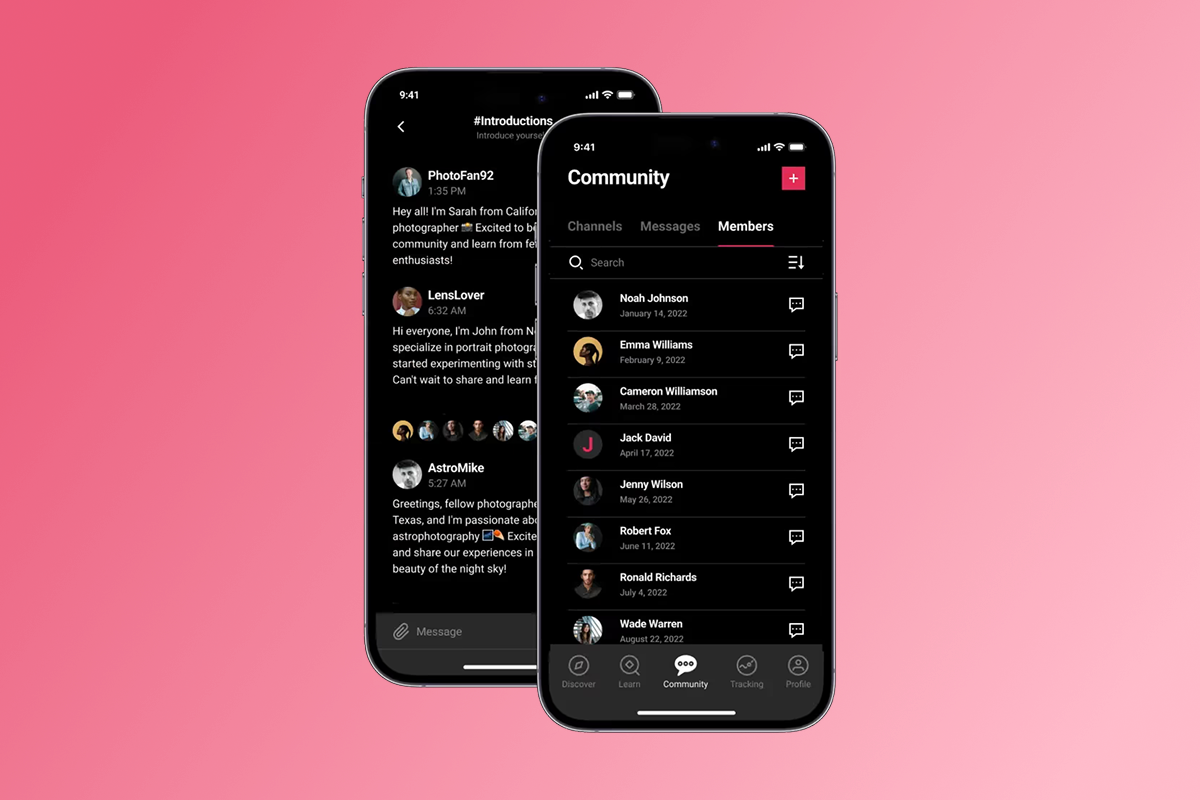
Set up one community channel this week. Call it "General" or "Member Lounge" so you have a place for member interaction from Day 1. The community feature includes posts, polls, and direct messaging, all in-app.
If you plan to offer challenges or cohorts, write the daily prompts or weekly themes in a Google Doc this week, but do not build them in the app yet. Launch with the course, then add a 30-day challenge in Month 2.
For health and fitness creators, this week often includes uploading workout videos, nutrition guides, and habit trackers. Other niches follow the same pattern: identify your highest-value lessons and migrate those first.
Week 3: Pricing, Payments, and Checkout Setup
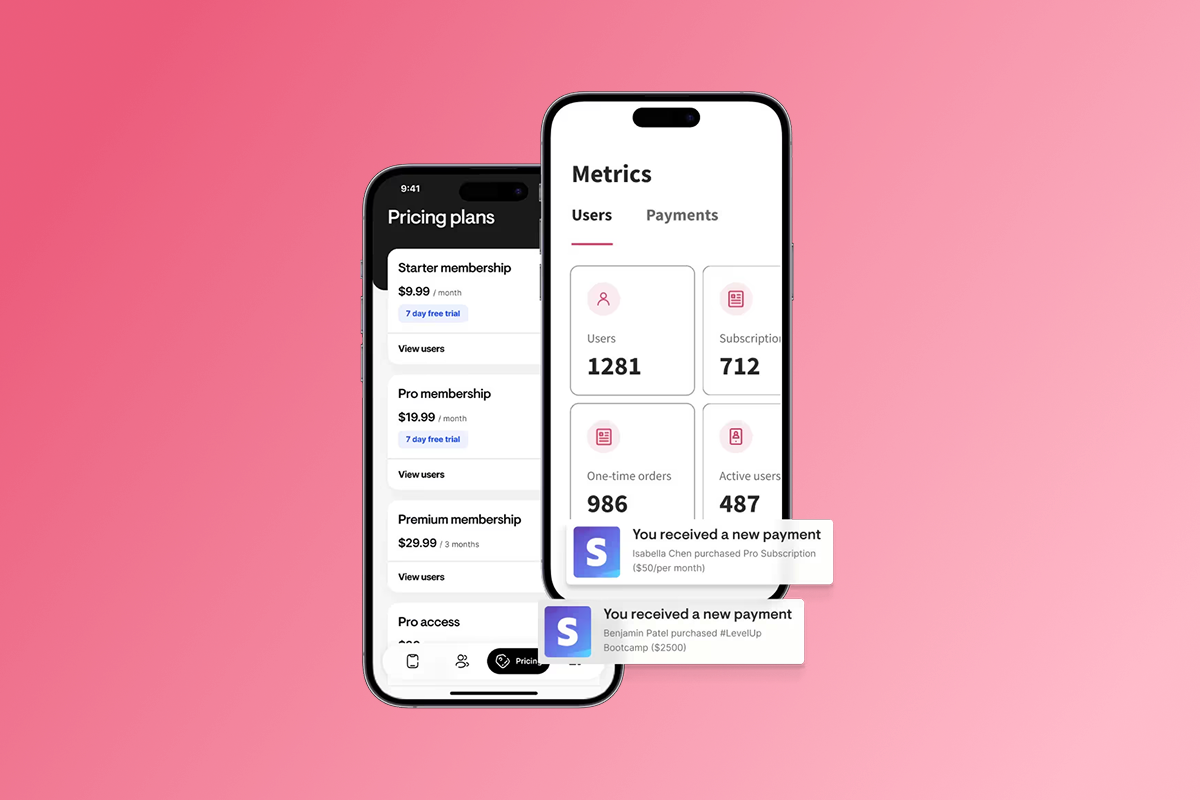
By Week 3, your content is live in the app preview. Now you monetize it. You have two checkout paths, and the choice affects your margin and conversion rate.
PassionPayments (web checkout): Members click a link and pay on a web page. Passion.io charges a 3.9% platform fee plus Stripe's processing (typically 2.9% + $0.30 per transaction), for a total of approximately 6.8% + $0.30 on web checkout. This path works well for bundles, annual plans, and higher-ticket offers.
In-App Purchases (IAP): Members buy directly inside the iOS or Android app using Face ID or Touch ID. Apple and Google retain 15% to 30% depending on your revenue (15% under $1M annually via the Small Business Program). IAP converts higher because the friction is lower (one tap, no form), but the fee is steeper. You can adjust IAP pricing tiers in your Apple and Google developer accounts to test price points.
Most successful creators use both: IAP for convenience and impulse buys, web checkout for margin-sensitive offers like annual memberships. Set up at least one monthly subscription and one annual option this week. Price your annual plan at 10 to 12 months' worth of monthly fees to incentivize commitment.
Connect your bank account to Stripe during this week. Bank verification can take up to 3 days, so start early. You do not want payment delays blocking your launch.
By Day 21, your pricing tiers should be live, your Stripe account verified, and your subscription structure published in the app.
Week 4: Testing and App Store Submission
Week 4 is polish, test, and submit. Invite 3 to 5 friends or beta members to test your app. Ask them to sign up, watch a lesson, post in the community, and complete a purchase (refund them afterward). You are checking for broken links, confusing navigation, and payment flow issues.
While testers explore the app, prepare your app store metadata. Apple and Google both require app descriptions, keywords, screenshots, and a privacy policy. Your screenshots must show actual app features per Apple's App Store Review Guidelines, not generic mockups. Capture 3 to 5 screens showing your course library, a lesson in progress, the community feed, and the subscription page.
Write a clear, benefit-focused app description. Do not say "This is my app." Say "Get daily yoga flows, habit tracking, and a private community of 500+ members. Stream or download lessons. Cancel anytime."
Upload your privacy policy. If you do not have one, use a generator or hire a freelancer on Fiverr for $50 to $100. Privacy violations are the number one reason for app rejections.
If you are using a personal Google Play developer account, start your testing period now. Google requires stress testingbefore publishing apps from personal accounts. Recruit testers in Week 3 and run this 14-day period in parallel with your iOS submission to avoid delays.
Submit to Apple by Day 28. Apple's review process states that 90% of submissions are reviewed in less than 24 hours, with most averaging 24 to 48 hours. Google reviews take 24 to 72 hours for standard apps. Budget a 1- to 2-week buffer for clarifications or resubmissions, especially if this is your first app.
On Passion.io's Expand and Plus plans, you receive dedicated submission support from a success manager who walks you through the metadata, screenshots, and submission steps. On Launch and Scale plans, you follow step-by-step guides in the help center and submit yourself.
By Day 30 to 60, your app is live or in final review. If approved, you are live. If rejected, you fix the issue (usually metadata or privacy policy) and resubmit in 1 to 3 days.
"Creating an App takes commitment, patience and time I've found... Slowly but surely we're getting there and I'm grateful for getting this far." - Dr. Liesl Roome Inc. on Trustpilot
What Usually Delays a Launch and How Do You Fix It?
The 30-60 day timeline assumes you avoid the three most common non-technical pitfalls.
Content perfectionism: Waiting to upload every module, bonus, and worksheet kills momentum. Launch with your core program and one community channel. Add a bonus module in Month 2. Your members want results, not exhaustive libraries. I have seen creators delay launches for 90 days trying to film "just one more video." Ship your minimum viable program and iterate based on member feedback.
Developer account delays: Applying for an Apple Developer Account in Week 4 means you are waiting until Week 6 or 7 to submit. If you need a D-U-N-S number for organization accounts, that adds more time. Fix: Register your accounts on Day 1, not when the app is ready.
Bank and payment verification lag: Stripe payout setup can take up to 3 days. If you connect your bank in Week 4, your first payments may pend until after launch. Fix: Complete Stripe onboarding in Week 3 when you set up pricing.
App Store metadata mistakes: Missing privacy policies, low-quality screenshots, or vague descriptions trigger rejections. Apple's App Store Review Guidelines flag apps that feel incomplete or misleading. Fix: Use real screenshots, write a specific description, and include a privacy policy from Day 1.
Google Play testing period: One creator noted that getting approved by Google Play Store is "a lot more challenging than Passion makes it sound" and required "over a dozen people to test it daily for weeks." The 14-day testing requirement for personal accounts is mandatory. Fix: recruit testers in Week 3 and run the 14-day period in parallel with your iOS submission. If you cannot wait, register a Google Play developer account as an organization instead.
Costs and Fees: Budgeting for Your Launch
Transparency on costs builds trust. Here is the all-in budget for a 30-60 day launch on Passion.io.
Platform subscription: Launch plan costs $99 per month billed annually, or $119 month-to-month. Scale plan is $239 per month billed annually. Expand plan is $599 per month billed annually ($699 monthly). All plans include hosting, updates, and the Passion Academy training app with courses, templates, and workshops.
Developer accounts: Apple Developer Program costs $99 per year. Google Play Developer is a $25 one-time fee. Total: $124 in Year 1, then $99 annually.
Transaction fees: If you use PassionPayments for web checkout, you pay a 3.9% platform fee plus Stripe processing (2.9% + $0.30 per transaction). If members purchase via in-app purchases, Apple and Google retain 15% to 30% (15% for developers earning under $1M annually). External checkouts processed outside PassionPayments carry 0% Passion.io platform fees, though payment processor fees still apply.
Optional costs: Privacy policy template ($50 to $100 on Fiverr). Custom graphics or app icon design ($100 to $300 if you hire a designer).
Monthly all-in estimate for a Launch plan creator: $99 plan + $8.25 Apple monthly equivalent + transaction fees on sales. If you sell $1,000 in your first month via web checkout, your fees are approximately $68, netting you $932 before the platform subscription.
Post-Launch: The First 30 Days Live
Your app is approved and live in the stores. Now the engagement phase begins. The first 30 days post-launch determine whether members complete content, renew subscriptions, and refer friends.
Send push notifications twice per week. Use them to welcome new members, remind them of unfinished lessons, and announce new content. Push notifications are the single biggest advantage of a native app over a website. They arrive on the home screen and do not rely on email deliverability.
Run a 30-day challenge in your app to spike daily active users. Challenges create accountability, social proof, and completion momentum. Structure it around one core outcome: "30 Days to Your First Handstand" or "30-Day Mindfulness Reset." Post daily prompts in the community, send push nudges, and celebrate member wins.
Gather reviews aggressively in the first two weeks. Ask satisfied members to rate your app in the App Store and Google Play. Apps with 50+ reviews and 4.5+ stars convert browsing users at higher rates.
Track engagement metrics weekly. Monitor daily active users (DAU), lesson completion rates, and community post frequency. If DAU drops below 20% of total members (a healthy baseline for subscription apps), increase your push cadence or introduce a new content drop.
Launch is not the finish line. It is the starting gun for your recurring revenue engine. Building an engaged community takes daily effort in the first 90 days, but the payoff is predictable monthly recurring revenue (MRR) and higher lifetime value (LTV) per member.
Taking the First Step Today
The next 30 to 60 days will pass whether you spend them researching more platforms and tweaking your logo, or building your app. Here is what to do today: register your developer accounts, outline your core content, and commit to a launch date.
Your app does not need every feature on Day 1. It needs one clear value proposition, a way to buy, and a reason for members to come back tomorrow.
If you are ready to move from tool sprawl and algorithm dependency to an app you own, explore Passion.io's platform demo or start with the Launch plan. The countdown starts when you decide to start.
"I purchased Passion.io to build an app... can't wait to launch my app within the next 1-2 months!" - LAT CPA Firm on Trustpilot
Frequently Asked Questions
Can I launch my web app in less than 30 days?
Yes. Your web app can go live in 2 weeks if your content is ready and you complete branding in Week 1. App store listings take an additional 2 to 6 weeks depending on account verification and review speed.
Do I need a developer account before I start building?
No. You can build your app in Passion.io while your Apple and Google accounts verify, but you cannot submit to stores until accounts are approved.
What happens if Apple rejects my app?
Apple typically flags metadata issues (missing privacy policy, vague description) or guideline violations (demo content, IAP setup). You fix the issue and resubmit in 1 to 3 days. Passion.io's help docs guide you through common rejection responses.
How do I choose between web checkout and in-app purchases?
Use web checkout for high-margin offers (annual plans, bundles) where you want to keep more revenue. Use IAP for convenience and mobile-first upsells where conversion matters more than margin.
Does Passion.io help with app store submissions?
Yes. Expand and Plus plans include dedicated submission support. Launch and Scale plans provide step-by-step guides in the help center.
Key Terms Glossary
Native App: An iOS and Android app downloaded from the App Store or Google Play that lives on your member's home screen and works offline.
PWA (Progressive Web App): A mobile-optimized website that can be saved to a phone's home screen with an icon, but it requires an internet connection and does not appear in the App Store or Google Play.
IAP (In-App Purchase): Buying a subscription or content inside an app using Apple or Google's payment system, with fees of 15% to 30%.
Push Notifications: Mobile alerts your app sends to a member's phone to announce new content, reminders, or community activity.
Developer Account: Your paid membership with Apple ($99/year) and Google ($25 one-time) that allows you to publish apps in their stores.
No-Code: Building app features by dragging and dropping elements instead of writing programming code.
PassionPayments: Passion.io's web checkout system for subscriptions and one-time purchases, charging a 3.9% platform fee plus Stripe processing.

Build the business
behind what you know.
Turn your expertise into a branded app with courses, community, and the You AI Coach. Launch plan from $99/month.